
Shopify fully supports multilingual blogs, and the fastest path is Shopify Markets with subfolder URLs, paired with Translate & Adapt or a compatible translation app for the heavy lifting. That combination handles hreflang tags and sitemap inclusion automatically once you publish a language, so you're not hand-coding technical SEO signals.
Here's your immediate action plan:
- Enable languages in your Shopify admin under Settings > Languages before touching content.
- Choose subfolder URLs (like
/fr/or/de/) instead of subdomains unless you're launching independent country stores. - Rank your blog posts by traffic and revenue impact, then translate the top performers first instead of everything at once.
One warning before you start: if you write posts that target different topics per market rather than true translations of the same article, don't force them into hreflang clusters. Shopify merchants in community forums report that mismatched hreflang pairs confuse Google more than they help, so let those posts rank as independent pages.
Key Takeaways
A multilingual Shopify blog succeeds when subfolder URLs, translated metadata, and correct hreflang scoping work together, not when any single piece is handled in isolation.
| Point | Details |
|---|---|
| Use subfolders by default | Subfolder URLs like /fr/ inherit domain authority and are the efficient default for most Shopify stores. |
| Translate every metadata field | Titles, meta descriptions, URL handles, and alt text all need translation, not just body copy. |
| Scope hreflang to true alternates | Only link true translations in hreflang clusters; exclude market-specific posts covering different topics. |
| Prioritize by traffic and intent | Translate top-performing posts first, and write fresh content when search intent differs by market. |
| Centralize the workflow | Tools like BlockPress combine keyword data, SEO scoring, and article audits inside Shopify to cut down on tool switching. |
Table of Contents
- Native Localization, Translation Apps, or Separate Stores: Which Fits Your Store?
- Setting Up Your Shopify Store for Multiple Languages
- How to Translate and Publish Multilingual Blog Posts in Shopify
- Getting Multilingual SEO Right on Every Translated Post
- Deciding What to Translate vs. What to Write Fresh for Each Market
- Building an Operational Workflow That Doesn't Break Under Scale
- Why Managing Translations Inside Shopify Beats Juggling Separate Tools
- Where to Verify the Details
- Sources
- FAQ
Native Localization, Translation Apps, or Separate Stores: Which Fits Your Store?
You have three real options, and the right one depends on how many languages you're supporting and how much content you're producing.
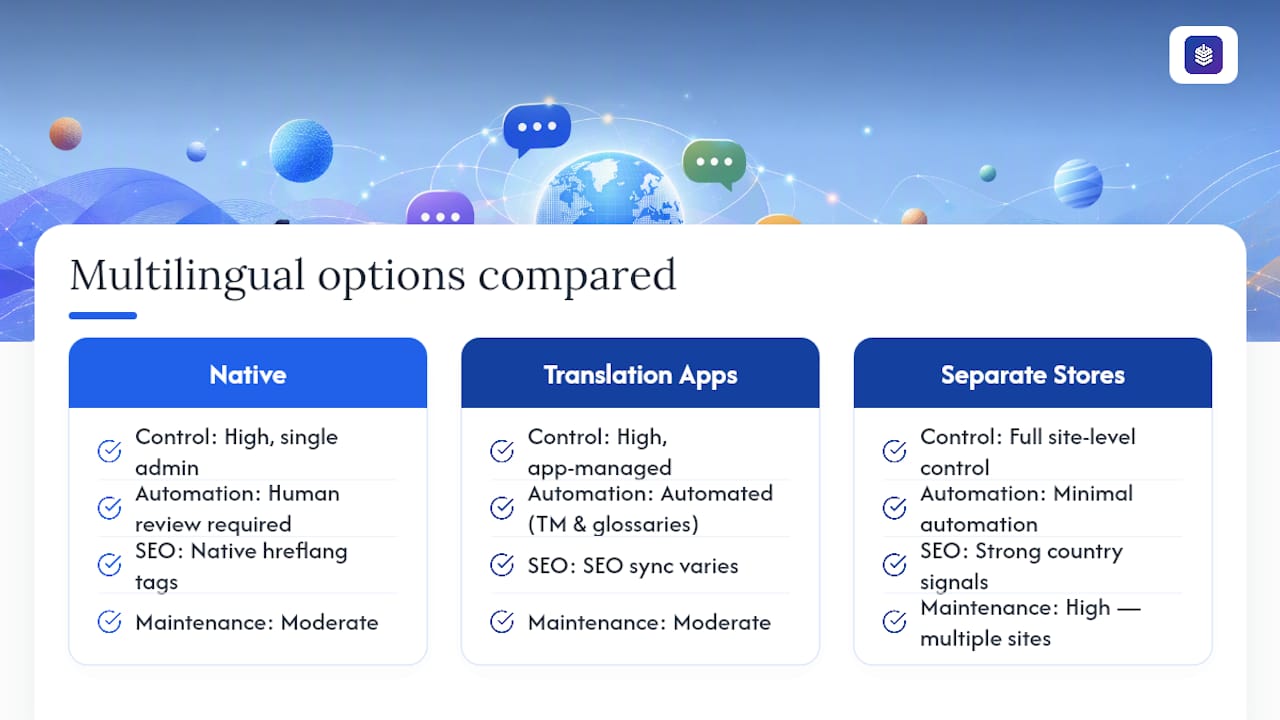
Shopify Markets plus Translate & Adapt gives you the most control. It generates hreflang tags natively and keeps everything inside one admin, but someone still has to sit down and translate each field by hand or paste in machine output for review. This works well if you're managing two or three languages and a modest publishing pace.
Third-party translation apps add automation on top of that foundation. Tools built around translation memory and glossaries cut down repetitive manual work, especially when you're reusing phrases across product descriptions and blog posts. The tradeoff: you need to verify the app actually syncs SEO fields and plays nicely with your theme, not just the visible body text.
Multiple stores, subdomains, or country-code domains send the strongest signals to search engines about which country you're targeting, but they multiply your maintenance load. Every store needs its own SEO setup, its own content calendar, and its own monitoring.
For most Shopify merchants, the practical starting point is subfolders combined with a hybrid workflow: an app or AI tool for the first draft, then a human reviewer for anything customer-facing. Reserve separate stores for when you're running genuinely distinct pricing, inventory, or legal terms by country, not just a different language.
Setting Up Your Shopify Store for Multiple Languages
Subfolders like /fr/ or /de/ are the efficient default on Shopify because they inherit your domain's existing authority instead of starting from zero on a new subdomain. A page ranking well on your .com root domain gives its translated subfolder version a head start that a fresh fr.yourstore.com wouldn't get.
Here's the setup sequence:
- Go to Settings > Markets in your Shopify admin and add the countries or regions you're targeting.
- Under Settings > Languages, add each language you want to publish, then assign it to the relevant market.
- Check your theme for a visible language selector. Most current free Shopify themes support this out of the box, but older or heavily customized themes sometimes need a manual addition or an update from your developer.
- Confirm your theme supports right-to-left layouts if you're adding Arabic or Hebrew, since not every theme handles RTL text direction correctly by default.
- Verify your theme uses Shopify's
routesLiquid object correctly, so localized URLs resolve instead of throwing errors. - After publishing a new language, check Google Search Console for the hreflang tags and language-specific sitemap entries Shopify generates automatically.
Pro Tip: Don't just glance at the storefront to confirm a language works. Open the page source and search for the hreflang attribute yourself. Shopify generates it automatically, but theme bugs occasionally strip it out, and you won't catch that from the front end alone.
How to Translate and Publish Multilingual Blog Posts in Shopify
Getting a translated post live involves more than swapping words. Here's the workflow that keeps you from losing metadata or breaking formatting along the way.
Using Translate & Adapt: Shopify's native app opens a side-by-side editor showing your original content next to an empty field for the translation. It's built for manual entry, though you can paste in machine-translated drafts for a human to clean up. This tool works well when you're translating a handful of posts and want full control over every sentence, and it also supports CSV import and export for bulk work.
CSV bulk workflow: For higher volumes, export your content to CSV, translate offline or through a translation service, then reimport. Make sure your export includes the title, body, meta description, URL handle, and image alt text fields, not just the post body. Skipping metadata is the most common mistake here. A translated post with an English meta description and an untranslated URL handle looks half finished to both readers and search engines.
App sync patterns: Third-party apps typically sync the body copy, title, and meta fields automatically, but alt text support varies by app. Check this before committing to a workflow, since missing alt text quietly kills your image search visibility in that language.
Your publishing sequence should look like this:
- Draft the translation (AI, app, or manual).
- Route it to a native speaker for review, not just a grammar check.
- Run an SEO pass on the title, meta description, and handle.
- Publish and confirm the post appears in the correct language's sitemap.
- Monitor indexing in Search Console over the following week.
Getting Multilingual SEO Right on Every Translated Post
Every field you translate carries its own SEO weight, and skipping any one of them creates a page that looks finished to you but reads as thin or broken to search engines. Titles and meta descriptions determine click-through in local search results. URL handles affect how clean and readable your links look to both users and crawlers. Image alt text feeds image search in that language, and excerpt or summary fields often get pulled into search snippets directly.

Shopify's own multilingual SEO guidance is direct about this: subfolders work best for most merchants, and every one of those metadata fields needs translation, not just the visible body copy.
Hreflang tags only belong on true alternates, meaning the same article translated into another language. If you're publishing a market-specific post that covers a different angle or topic for a particular region, leave it out of the hreflang cluster entirely. Reciprocal linking matters too: if your English page points to your French version via hreflang, the French version needs to point back, or Google may disregard the signal altogether.
Here's how to confirm everything is working:
- Check the International targeting report and Coverage report in Google Search Console for each language.
- Confirm your language sitemap includes every published translated post, not just your storefront pages.
- Search for a phrase unique to your translated post in the target language to see if Google has indexed it.
On canonical tags: don't point every language version back to your original as the canonical source. That tells search engines to ignore the translated pages entirely. Reserve that approach only for minor, near-duplicate machine-generated variants you don't want indexed as separate pages. Merchants who get localization right, including SEO fundamentals like these, often see measurable gains in both conversion rate and international traffic.
Deciding What to Translate vs. What to Write Fresh for Each Market
Not every post deserves a translation, and not every market needs the same content. Build a simple decision matrix before you commit translation budget anywhere.
Ask three questions about each post: does it already drive meaningful traffic or conversions in your primary language, does the topic apply the same way in the target market, and does search intent match across languages for that keyword? A post about layering wool sweaters for winter doesn't translate cleanly to a market where winter falls in July.
When the answer to intent-matching is no, write a separate, market-specific article instead of forcing a translation. Community feedback on Shopify's own forums backs this up directly: merchants who tried translating posts with mismatched local intent saw indexing confusion, not clean rankings. Treat those localized originals as independent pages competing on their own merits.
For everything else, prioritize your translation backlog by traffic first, then by product tie-in, then by seasonal relevance. Your top three organic posts should get translated before you touch a low-traffic post just because it's next on the calendar.
Run keyword research separately for each language and region rather than translating your English keyword list directly. Search volume, phrasing, and even the questions people ask shift by market, and your CTAs and examples should shift with them.
Pro Tip: Keep a simple spreadsheet tracking which posts are translated, which are pending, and which markets get original content instead. Without it, teams tend to either duplicate effort or quietly let the backlog stall after the first few posts.
Building an Operational Workflow That Doesn't Break Under Scale
Multilingual publishing falls apart when it's treated as a one-person side project instead of a defined process with owners at each stage.
Assign four roles even if one person wears multiple hats: a localization owner who prioritizes what gets translated, a translator or editor who produces the copy, an SEO reviewer who checks metadata and hreflang, and a developer on call for theme issues.
A workable hybrid sequence looks like this:
- AI or an app produces the first-pass translation.
- A human editor reviews it for tone, accuracy, and local phrasing.
- An SEO reviewer checks the title, meta description, handle, and alt text.
- The post publishes, and someone confirms it hits the sitemap.
Reserve mandatory human review for anything touching checkout copy, legal terms, or calls to action. Shopify's own AI localization guidance recommends this exact split: automation for volume, human eyes for anything with legal or financial stakes.
Before anything goes live, run through a short QA pass: preview the post in-theme, click the language selector to confirm it displays correctly, verify reciprocal hreflang tags, and confirm every metadata field is filled in. After launch, watch Search Console indexing status, organic traffic by language, and bounce rate for the first two weeks to catch problems early.
Why Managing Translations Inside Shopify Beats Juggling Separate Tools
Most merchants end up stitching together a translation app, a separate SEO tool, and a spreadsheet to track what's been published where. That's three logins and three places for something to fall through the cracks.
BlockPress consolidates the parts of this workflow that usually live in different apps. It surfaces real Google keyword data per post, scores SEO and UX live as you write, and generates AI drafts you can adapt for a specific market instead of starting from a blank page. Article health audits flag translated posts with missing metadata or thin content before they go live, and per-article analytics let you see which language versions are actually driving traffic, not just guessing from aggregate numbers.
Bulk drip-publishing matters most once your translation backlog grows past a handful of posts, letting you schedule a batch of localized articles without manually publishing each one on its own timeline. Author bio pages add a layer of credibility per market too, useful when a native reviewer's name should appear alongside the content they edited.
The operational win is fewer context switches. One editor, one set of audits, one place to check whether a French post is underperforming its English counterpart.
Where to Verify the Details
For configuration specifics, start with Shopify's localization and translation documentation and the multilingual SEO guide on Shopify's blog. For edge cases like app-specific sync issues, Shopify Community threads and vendor guides such as SimpleLocalize's Shopify integration notes cover troubleshooting details official docs skip.
What Realistic Localization Results Look Like
Localization rarely pays off across every post you translate. It pays off on the handful that actually match search intent in the new market, and those tend to produce the conversion lift merchants hope for. Start with your five best-performing posts, translate those properly, including metadata, and expand from there once you see which languages respond.
— Rodney
Manage Your Multilingual Blog Without Leaving Shopify
If you've read this far, you've seen how many moving pieces a multilingual blog actually has: metadata translation, hreflang scoping, sitemap checks, and a publishing calendar that can't slip. BlockPress puts the drafting, SEO scoring, and audit work in one editor inside your Shopify admin, so you're not bouncing between a translation app, a separate SEO checker, and a spreadsheet to track what's live.
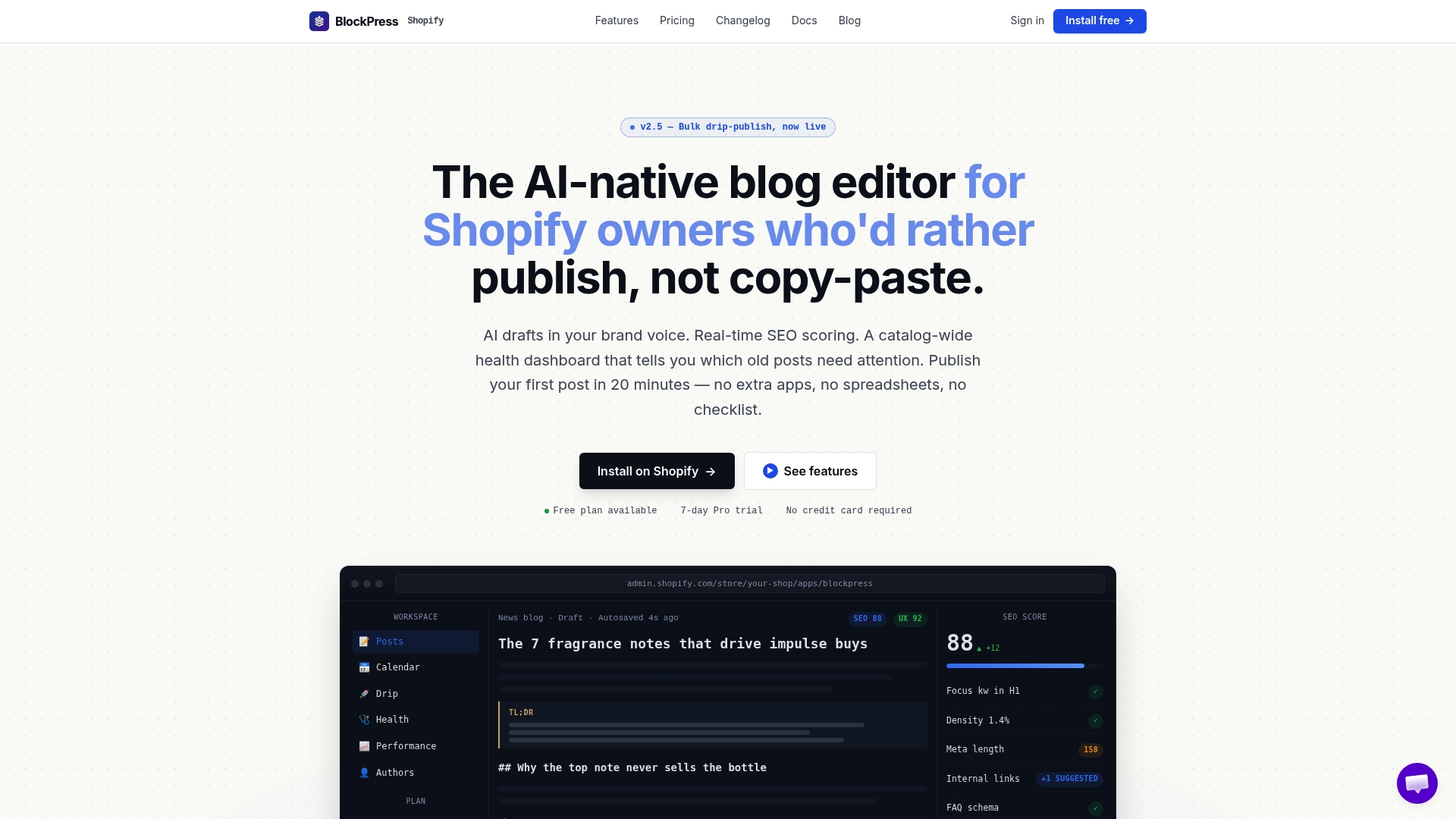
Its feature set includes live SEO and UX scoring per post, AI-generated drafts you can adapt per market, article health audits that catch missing metadata before it costs you rankings, and per-article analytics that show which language versions are actually converting. Bulk drip-publishing handles the scheduling once your translation backlog grows. If your current process for handling content creation workflows feels scattered across three tools, start a trial and see what one editor inside Shopify does for your next translated post.
Sources
- Localization and translation — Shopify Help
- How to handle different blog content per language? (not translations) — Shopify Community
- Shopify blog translations — SimpleLocalize
FAQ
Can Shopify Blogs Support Multiple Languages Natively?
Yes. Shopify Markets lets you publish languages that automatically generate language-specific URLs, hreflang tags, and sitemap entries once you activate them in your admin.
Should I Use Subfolders or Subdomains for a Multilingual Shopify Blog?
Subfolders like /fr/ are the better default for most stores because they inherit your existing domain's authority, while subdomains or separate ccTLD stores make sense only when you need distinct country operations.
Do I Need to Translate Every Blog Post?
No. Translate high-traffic, high-conversion posts first, and write separate market-specific articles when search intent or topic relevance differs by region instead of forcing a direct translation.
What Happens if I Add Hreflang Tags to Posts That Aren't True Translations?
Mismatched hreflang pairs can confuse search engines and lead them to disregard the language signal entirely, so exclude market-specific posts from hreflang clusters and let them rank independently.
Can an Editor Like BlockPress Help Manage Translated Blog Posts?
Yes. BlockPress centralizes keyword data, SEO scoring, article health audits, and per-article analytics inside Shopify, which reduces the tool switching that usually slows down multilingual publishing.