
The single biggest payoff from integrating AI into your content workflow is speed without sacrificing quality: teams that pair generative models with proper governance publish faster, spend less per asset, and catch errors before readers ever see them. An agentic AI system built on Amazon Bedrock cut webpage assembly time from up to four hours down to roughly ten minutes, a drop of more than 95%. Retrieval-augmented generation (RAG) grounds AI output in your own source documents instead of letting a model guess, which is the difference between a usable draft and a liability.
Here's what shows up first when you connect AI to your content pipeline correctly:
- Faster time-to-publish — hours of manual assembly compressed into minutes for structured content types
- Lower cost per asset — one editor can now oversee output that used to require a small team
- More consistent quality — brand voice and formatting rules get enforced automatically, not remembered manually
- Real personalization at scale — product pages, emails, and landing copy adapt to segments without rebuilding from scratch
- Shopify-native options — tools like Shopify Magic, Shopify Sidekick, and Blockpress let merchants get these gains without stitching together three separate apps
Key Takeaways
AI content workflow integration works when generative drafting is paired with retrieval-grounded accuracy checks and a human validation step before anything publishes.
| Point | Details |
|---|---|
| Speed gains are real but conditional | Agentic AI cut page assembly from up to four hours to about ten minutes, but only with validation gates in place. |
| RAG prevents hallucinations | Grounding output in your own documents is the most reliable way to keep AI content factually accurate. |
| Pilot narrow, then scale | Test one bounded use case for four to six weeks before expanding to your full content calendar. |
| Track KPIs beyond volume | Measure time-to-publish, cost per asset, and conversions, not just how many pages you generated. |
| Blockpress fits Shopify workflows natively | It combines AI drafting, live SEO scoring, and bulk publishing inside Shopify, replacing the need for separate connector apps. |
Table of Contents
- What Does AI Content Workflow Integration Actually Mean?
- The Architecture Behind a Working AI Content Pipeline
- Where AI Adds the Most Value Across the Content Lifecycle
- What Measurable Benefits Should You Expect, and When?
- How Do You Actually Integrate AI Into Your Content Workflow?
- Which Tools Belong in Your AI Content Tech Stack?
- What Risks Should You Manage Before Scaling AI Content?
- Which KPIs Prove Your AI Content Workflow Is Working?
- How Long Does AI Content Integration Take, and What Does It Cost?
- What Do Real AI Content Integration Results Look Like?
- What Should You Check Before You Scale AI Across Your Content Operation?
- Where Most Teams Get AI Content Integration Wrong
- Get AI Drafting, SEO Scoring, and Publishing in One Shopify Editor
- Sources
- FAQ
What Does AI Content Workflow Integration Actually Mean?
AI content workflow integration means connecting generative and retrieval-based AI models directly into the systems you already use to plan, produce, and publish content, rather than treating AI as a separate tool you copy and paste from. The scope covers the whole content lifecycle, not just drafting.
That includes:
- Ideation and research — surfacing topics, questions, and competitive gaps
- Drafting — generating first-pass copy, outlines, or full articles
- Editing and validation — checking facts, tone, and structure before anything ships
- Publishing — pushing approved content into your CMS or storefront
- Personalization — adapting the same base content for different segments or products
- Distribution — repurposing one asset into email, social, and video formats
- Maintenance — auditing and refreshing older content as it decays
It helps to separate three technical approaches you'll hear mentioned interchangeably. Generative AI produces new text or media from a prompt. RAG adds a retrieval step that pulls from your own documents, product catalog, or brand guidelines before generating, which is why RAG is considered the most reliable method for reducing hallucinations in production content. Agentic workflows go a step further, chaining multiple AI steps together (research, then draft, then format, then validate) with minimal human intervention between each one. Most mature content operations use all three at different stages.
The Architecture Behind a Working AI Content Pipeline
A functional AI-enabled content workflow runs on five layers: a knowledge source, a model or agent layer, an orchestration runtime, a CMS connector, and a QA and analytics layer that closes the loop. Skip any one of them and the whole system gets shakier.
- Knowledge vault or data source — your brand guidelines, product catalog, and past content, stored in a way models can query. This is what RAG retrieves from, and it's what keeps outputs grounded instead of invented.
- Model or agent layer — the generative engine doing the actual writing, summarizing, or formatting work.
- Orchestration runtime — the logic that sequences steps (research, then draft, then check, then publish) and passes data between them.
- CMS connector — the integration that pushes finished content into your storefront or blog without manual copy-paste.
- QA and analytics hooks — validation gates that catch factual errors or brand violations before publishing, plus the tracking that tells you whether any of this is working.
Picture data flowing from your knowledge vault into a RAG step, which feeds an agent that drafts and formats, which then passes through a validation gate before landing in your CMS. Each arrow in that chain is a place where governance either holds or breaks.
Pro Tip: Build your knowledge vault before you pick a model. A well-organized set of brand guidelines and past content will improve output quality more than switching between AI providers ever will.

Where AI Adds the Most Value Across the Content Lifecycle
AI delivers the clearest gains at the stages that are repetitive, structured, or time-boxed: ideation, first drafts, metadata, localization, personalization, and repurposing. These are tasks with a pattern, which is exactly what generative models handle well.
- Ideation and outlines — generating topic clusters or article structures in minutes instead of a full brainstorming session
- First drafts — producing a workable starting point that a human editor shapes, rather than starting from a blank page
- Metadata and SEO fields — auto-generating meta descriptions, alt text, and title tags at catalog scale
- Localization — adapting copy for different markets without a full manual rewrite for each one
- Personalization — Shopify's built-in AI features, including Shopify Magic and Shopify Sidekick, automate product copy and inventory-driven personalization directly inside a merchant's store
- Repurposing — turning one article into a video script with Synthesia, a podcast clip with Descript, or an email sequence with Klaviyo
- Content audits — flagging outdated or underperforming pages across a large catalog
- Automated page assembly — pulling product data, images, and copy into a finished page without manual layout work
A Shopify store standardizing product descriptions at scale reported 34% organic growth after moving from manual, inconsistent copy to a structured AI-assisted workflow. That's the pattern: the win rarely comes from one clever prompt. It comes from applying the same disciplined process across hundreds of assets a human would never get to individually.
What Measurable Benefits Should You Expect, and When?
Expect faster cycle time, lower cost per published asset, and more consistent quality once governance is actually in place, not before. The size of the gain depends heavily on your catalog size and publishing cadence.
- Time-to-publish — the AWS Bedrock case dropped page assembly from up to four hours to about ten minutes, a benchmark for what agentic workflows can achieve on structured, repetitive page types
- Output volume — teams running methodical, governed AI workflows report 3 to 5 times output improvements compared to manual-only production
- Cost per asset — fewer manual handoffs means one editor can supervise output that previously needed a larger team, though the exact savings depend on your current headcount and tooling
- Consistency — brand voice and formatting stay uniform across hundreds of pages instead of drifting between writers
- Personalization depth — segments that were too small to justify custom copy manually become viable once generation is near-instant
These numbers assume a working QA gate. A large catalog with a steady publishing cadence (dozens of pages a month or more) will see the clearest speed and cost gains, because the fixed cost of setting up the pipeline gets amortized across more output. A small team publishing four articles a month will see quality and consistency gains before it sees dramatic cost savings, simply because there's less volume to average the setup cost against.
How Do You Actually Integrate AI Into Your Content Workflow?
The playbook runs in four phases: assess your current workflow, pilot on a narrow use case, build governance around what works, then scale. Skipping straight to scale is the most common way teams end up with inconsistent, unreviewed AI output flooding their site.
- Audit your current workflow. Map every step from idea to published page, and mark which ones are repetitive versus which require real judgment.
- Choose one pilot use case. Pick something bounded, like meta descriptions for an existing catalog or first-draft blog outlines, not your entire content calendar.
- Assemble your knowledge base. Gather brand guidelines, past high-performing content, and product data the AI will draw from.
- Configure your RAG or agent setup. Connect the model to your knowledge vault so outputs are grounded, not invented from scratch.
- Define validation checkpoints. Decide who reviews what, and at which stage, before anything publishes.
- Run the pilot for a fixed period. Give it enough time to generate a real sample, typically four to six weeks.
- Measure against a baseline. Compare time-to-publish, error rate, and output volume against your pre-AI numbers.
- Optimize, then expand. Fix what broke, then extend the same process to a second use case.
Minimum viable success looks like: fewer manual editing hours per asset, no increase in factual errors, and consistent brand voice across the pilot batch. If you're hitting all three, that's your signal to scale to the next use case rather than the whole calendar at once.
Pro Tip: Run your pilot on a use case with an existing baseline you can measure against. Without a "before" number, you won't be able to prove the "after" was worth the setup work.
Which Tools Belong in Your AI Content Tech Stack?
Your stack needs six categories covered: foundation models, agent orchestration, RAG or embedding storage, CMS connectors, SEO and analytics tools, and multimodal editors for repurposing. No single tool covers all six well, which is why high-performing teams chain specialized tools together rather than expecting one platform to do everything.
- Foundation models and agent infrastructure — Amazon Bedrock is a common architectural choice for teams building custom agentic pipelines that need model flexibility and enterprise-grade controls
- Content ops and drafting — Jasper handles brand-voice-aware drafting for teams that need consistent output across writers
- Document and asset management — Box provides the storage and access layer many knowledge vaults are built on top of
- Ecommerce-native AI — Shopify Magic and Shopify Sidekick generate product copy and store content without leaving the Shopify admin
- Email and lifecycle content — Klaviyo automates personalized email flows tied to customer and inventory data
- Multimodal repurposing — Descript turns written content into edited video and audio; Synthesia generates video from a script
- CMS-native editing and SEO — Blockpress combines AI drafting, live SEO scoring, and publishing directly inside Shopify, closing the gap between drafting and shipping
- Enterprise content operations — Gradial focuses on scaling personalized content production across large catalogs
Whatever you choose, confirm it has real CMS API access, version history, and audit logs before you commit. Without those three, you can't prove what changed or roll back a mistake.
Pro Tip: Test CMS connector reliability before evaluating model quality. A brilliant draft that requires manual re-formatting into your CMS erases most of the time savings you're chasing.
What Risks Should You Manage Before Scaling AI Content?
The five biggest operational risks are hallucinations, brand voice drift, accessibility failures, copyright exposure, and data leaks, and each one has a specific, testable mitigation. Ignoring any of them tends to surface only after you've already scaled, which is the expensive way to find out.
- Hallucinations — mitigate with RAG and source logging so every generated claim traces back to an actual document
- Brand drift — maintain a style vault with approved voice examples that the model references on every generation
- Accessibility failures — run automated accessibility checks on generated content before publishing, not after
- Copyright and originality issues — treat AI drafts as a starting point requiring human review, never a final asset shipped untouched
- Data privacy and security — confirm which of your data leaves your environment when you send it to a model provider, and whether it's used for training
Before scaling past a pilot, run this checklist: source grounding confirmed, style vault in place, accessibility scan passing, human review step assigned, and audit trail logging every generated asset. Contentstack's guidance on composable frameworks recommends knowledge vaults specifically to keep agentic systems from drifting off brand as they run with less supervision.
Pro Tip: Log every AI-generated claim back to its source document. When something goes wrong, and eventually something will, that log is the difference between a five-minute fix and a week of forensic editing.

Which KPIs Prove Your AI Content Workflow Is Working?
Track time-to-publish, pages produced per month, cost per asset, organic sessions, and content-driven conversions as your primary KPIs, because these are the metrics that translate directly into budget decisions. Vanity metrics like word count generated tell you nothing about whether the content actually works.
- Time-to-publish — measure from brief to live page, instrumented in your CMS's timestamp logs
- Output volume — pages or assets published per month, tracked against your pre-AI baseline
- Cost per asset — total editorial hours plus tooling cost divided by assets shipped
- Organic sessions — pulled from your analytics platform, segmented by AI-assisted versus manually written pages
- Conversion rate from content — tracked through your ecommerce analytics to see whether faster output holds up on revenue, not just traffic
Faster research cycles alone can cut a major bottleneck in the content pipeline, and NICE frames speed, accuracy, and scale as the core outcomes worth measuring in any workflow automation. A realistic before/after scenario: a team publishing 8 articles a month manually moves to 20 with AI-assisted drafting, while cost per article drops because editing replaces writing from scratch as the main time sink.
How Long Does AI Content Integration Take, and What Does It Cost?
A narrow pilot typically takes four to eight weeks; a full enterprise rollout across multiple content types usually runs three to six months. The timeline depends far more on how messy your existing content and data are than on which AI tool you pick.
- Audit phase — one to two weeks to map your current workflow and gaps
- Pilot setup — one to two weeks to configure your knowledge base and connect tools
- Pilot run — four to six weeks to generate a measurable sample
- Iterate and refine — two to four weeks fixing what the pilot revealed
- Scale to additional use cases — ongoing, phased rollout rather than a single cutover
Cost drivers include custom CMS integrations, model hosting or API fees, the labor to prepare your knowledge base, human review time, and software licensing. Teams that already have clean, well-organized content and a documented brand voice cut their setup cost significantly, because the knowledge vault step is mostly done already.
What Do Real AI Content Integration Results Look Like?
The strongest documented result comes from the AWS Bedrock case, where agentic AI cut webpage assembly time from up to four hours down to roughly ten minutes while adding real-time validation during the process itself. That's not a marginal efficiency gain. It's a structural change in how fast a page can go from brief to live.
A second example: a Shopify merchant that standardized product descriptions across its catalog using structured AI workflows saw 34% organic growth, driven by consistent, keyword-aware copy replacing ad hoc writing across hundreds of listings. The automation here wasn't creative writing. It was disciplined consistency applied at a scale no manual team could match.
The shift that matters isn't AI writing better sentences than a human. It's AI holding a consistent standard across a thousand pages that a five-person team could never review individually, then flagging the ones that need a human's judgment.
When you map these examples to your own environment, look for the same conditions: a large volume of similar, structured content, a clear validation step, and a metric you tracked before you started. Without a baseline, you can't tell a genuine result from a lucky quarter.
What Should You Check Before You Scale AI Across Your Content Operation?
Before scaling past your pilot, confirm: your knowledge vault is current, your style guide is documented, accessibility checks pass automatically, a human reviews every asset before publishing, your audit trail logs sources, your CMS connector works without manual reformatting, your KPIs are instrumented, and your rollback plan is tested.
- Knowledge vault reflects current brand guidelines and product data
- Style guide documented and referenced by the model
- Accessibility scans run automatically pre-publish
- Human review assigned at a specific, named checkpoint
- Audit trail logs every source claim traces to
- CMS connector confirmed to publish without manual cleanup
- KPIs instrumented in analytics before the first asset ships
- Rollback plan tested, not just written down
Pro Tip: Add a dedicated fact-check column to your editorial calendar for every AI-assisted piece. It takes thirty seconds to fill in and it's the single cheapest safeguard against a hallucinated statistic making it to your storefront.
Review cadence matters as much as the initial setup. Revisit your knowledge vault and style guide quarterly, since brand voice and product lines shift faster than most teams update their AI reference documents.
Where Most Teams Get AI Content Integration Wrong
If you're starting from zero, the single best first project is a narrow, well-defined use case like meta descriptions or product copy for one collection, not a full rewrite of your blog. The mistake I see most often is teams adopting an AI writing tool and skipping the governance layer entirely, treating the model's output as finished copy rather than a first draft that still needs a human checkpoint.
That gap is where brand drift and factual errors creep in, quietly, until someone notices a page that doesn't sound like the brand at all. The fix isn't slowing down. It's building the validation step in from day one, even on a small pilot, so the habit is already in place by the time you're ready to scale to your full catalog.
Get AI Drafting, SEO Scoring, and Publishing in One Shopify Editor
Blockpress puts the entire workflow this article just described, drafting, SEO validation, and publishing, inside the same editor you already use to run your Shopify store, instead of stitching together three separate apps to get there.
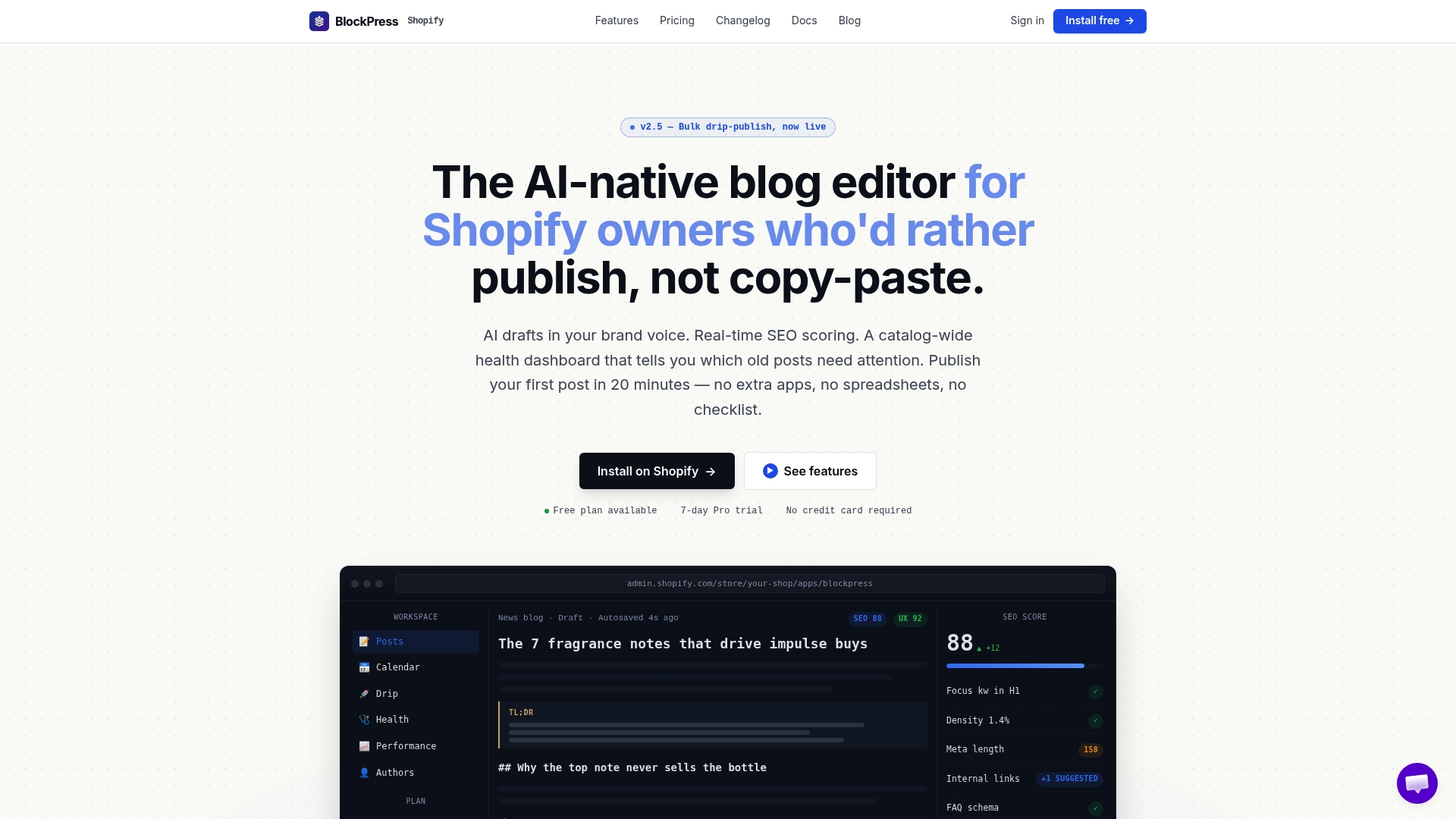
For Shopify merchants specifically, that means skipping the integration work most of this article covers: no separate knowledge base to configure, no CMS connector to build, because it's already native to your store. Here's what maps directly to the workflow benefits covered above:
- AI-generated drafts in your brand voice, pulling from real Google keyword data instead of guessing at topics
- Live SEO and UX scoring as you write, so validation happens before publishing rather than after
- Bulk drip-publishing for catalog-scale content without manual scheduling
- Article health audits that flag underperforming or outdated pages automatically
- Per-article analytics so you can track the exact KPIs this article recommends, without exporting data between tools
Check the full capability list on the Blockpress features page, or go straight to Blockpress to start drafting your next article inside your Shopify admin.
Sources
These sources were chosen because they combine documented case metrics, vendor architecture detail, and practical operating guidance rather than generic AI hype.
- From hours to minutes: how agentic AI gave marketers time back for what matters — AWS Machine Learning Blog
- The Complete Guide to AI Content Creation in 2026 — SimilarLabs
- Maximizing content velocity: Best uses of AI agents for content production — Contentstack
- Benefits of AI Workflow Automation | Speed, Accuracy & Scale — NICE
FAQ
What is AI workflow integration?
AI workflow integration means connecting generative and retrieval-based AI models directly into your existing content systems, such as your CMS or ecommerce platform, so tasks like drafting, validation, and publishing happen within one connected pipeline rather than as separate manual steps.
What is the 30% rule in AI?
There's no single, universally agreed "30% rule" specific to AI content workflows; if you've seen the term, it likely refers to a general benchmark some teams use for how much AI-assisted output they allow before requiring deeper human review, and that threshold varies by team and risk tolerance.
What are the benefits of using a workflow?
A structured workflow, with or without AI, reduces repeated manual steps, creates a consistent quality standard, and makes it possible to measure where time and cost actually go, which is what allows a team to improve the process over time instead of guessing.
What are the benefits of AI content creation?
Do I need a separate app for AI drafting and SEO on Shopify?
Not necessarily. Tools like Blockpress combine AI drafting, live SEO scoring, and publishing inside the Shopify admin, which removes the need to run three separate apps to cover the same ground.