
The six editorial calendar best practices that matter most in 2026 are: tie every entry to a business objective, map content to buyer-journey stages, set a cadence your team can sustain for six months, plan capacity before you fill dates, add AI-awareness and measurement fields to each entry, and run quarterly sprint reviews to keep the calendar accurate. Your single next step this week: open your current calendar and add a "Business Objective" column and an "Audience Stage" column to the next 30 days of entries. That one change turns a publishing schedule into a strategic asset.
Here is the full checklist:
- Tie entries to business objectives. Every piece of content should trace back to a measurable goal (pipeline, SEO, retention, awareness).
- Map to buyer-journey stages. Label each entry as awareness, consideration, or decision so your mix stays balanced.
- Set a sustainable cadence. Choose a publishing frequency your team can hold for six months, not just six weeks.
- Plan capacity first. Count available hours per role before you commit to a schedule.
- Add AI-awareness and measurement fields. Flag AI-assisted drafts, track SEO targets, and link each entry to a KPI.
- Run quarterly sprints. Review, prune, and re-prioritize every 90 days rather than editing the calendar daily.
According to the CMI 2026 B2B Content and Marketing Trends report, A substantial portion of B2B marketers plan to increase investment in AI-powered tools in 2026, making AI-aware calendar fields a practical necessity rather than a nice-to-have.
Key Takeaways
A strategic editorial calendar for 2026 requires AI-aware fields, named owners, a sustainable cadence, and quarterly sprint reviews tied to measurable business objectives.
| Point | Details |
|---|---|
| Start with capacity, not dates | Count available hours per role before committing to a publishing schedule. |
| Add two critical columns now | "Business Objective" and "Audience Stage" turn a schedule into a strategic tool. |
| AI investment is rising fast | 45% of B2B marketers plan to increase AI tool spending in 2026, per CMI research. |
| Sustainable cadence beats volume | One well-researched post per week outperforms three thin ones for SEO and pipeline. |
| Blockpress for Shopify merchants | Blockpress integrates editorial calendar, AI drafts, and SEO signals inside Shopify. |
Table of Contents
- What are the editorial calendar best practices for 2026? A seven-step process
- Who should be on your calendar and how do you plan capacity?
- How do you choose a content mix and cadence that lasts?
- What fields should every calendar entry include?
- Which tool should you use for your editorial calendar in 2026?
- What 2026 trends should you bake into your editorial calendar?
- How do you measure editorial calendar success and iterate?
- What actually makes an editorial calendar work in practice?
- Blockpress gives Shopify merchants an integrated editorial calendar and AI blog editor
- Sources
- FAQ
What are the editorial calendar best practices for 2026? A seven-step process
The Content Marketing Institute's seven-step framework gives you a replicable sequence for turning strategy into a populated calendar. Here is how to apply it for a single quarter:
- Plan capacity. Before anything else, count the realistic hours each team member can contribute per week. Subtract meetings, approvals, and unplanned work. What remains is your true production budget.
- Set quarter goals. Assign one to three measurable objectives to the quarter (e.g., grow organic traffic 20%, generate 50 MQLs from content, rank for five target keywords). Every entry you add later should serve at least one of them.
- Define content pillars. Choose three to five topic pillars that map to your product, your audience's problems, and your competitive gaps. Pillars prevent the calendar from drifting into random topics.
- Choose your cadence. Match publishing frequency to your capacity budget, not your ambition. One well-researched post per week beats three thin ones.
- Build the calendar template. Set up the fields every entry needs (see Section 5 for the full field list) before you populate any dates. Structure first, content second.
- Populate the next four weeks. Fill in working titles, owners, formats, and publish dates for the immediate window only. Leave later weeks as pillar placeholders until you have confirmed capacity.
- Set a review rhythm. Schedule a 20-minute weekly production check and a 60-minute quarterly sprint review. Put both on the calendar now so they do not get dropped.
Pro Tip: Build a 48–72 hour review buffer into every asset's production timeline. If a piece is due to publish on Friday, the final approval deadline should be Wednesday. Teams that skip this buffer consistently miss publish dates when a single stakeholder is unavailable.
Who should be on your calendar and how do you plan capacity?
A calendar without named owners is a wish list. Every entry needs a person accountable for each stage of production. The core roles to document are:
- Content owner — the person responsible for the piece from brief to publish
- Subject matter expert (SME) — provides technical accuracy, interviewed or reviewed
- Editor — reviews for quality, consistency, and brand voice
- Designer — handles visuals, graphics, or video assets
- Distribution lead — schedules social, email, and syndication
- Approver — legal, compliance, or executive sign-off where required
Time budget per asset (sample template)
| Role | Blog post (hrs) | Social set (hrs) | Email (hrs) |
|---|---|---|---|
| Content owner | 4–6 | 1–2 | 2–3 |
| SME review | 1–2 | 0.5 | 0.5–1 |
| Editor | 1–2 | 0.5 | 1 |
| Designer | 2–3 | 1–2 | 1 |
| Approver | 0.5–1 | 0.5 | 0.5 |
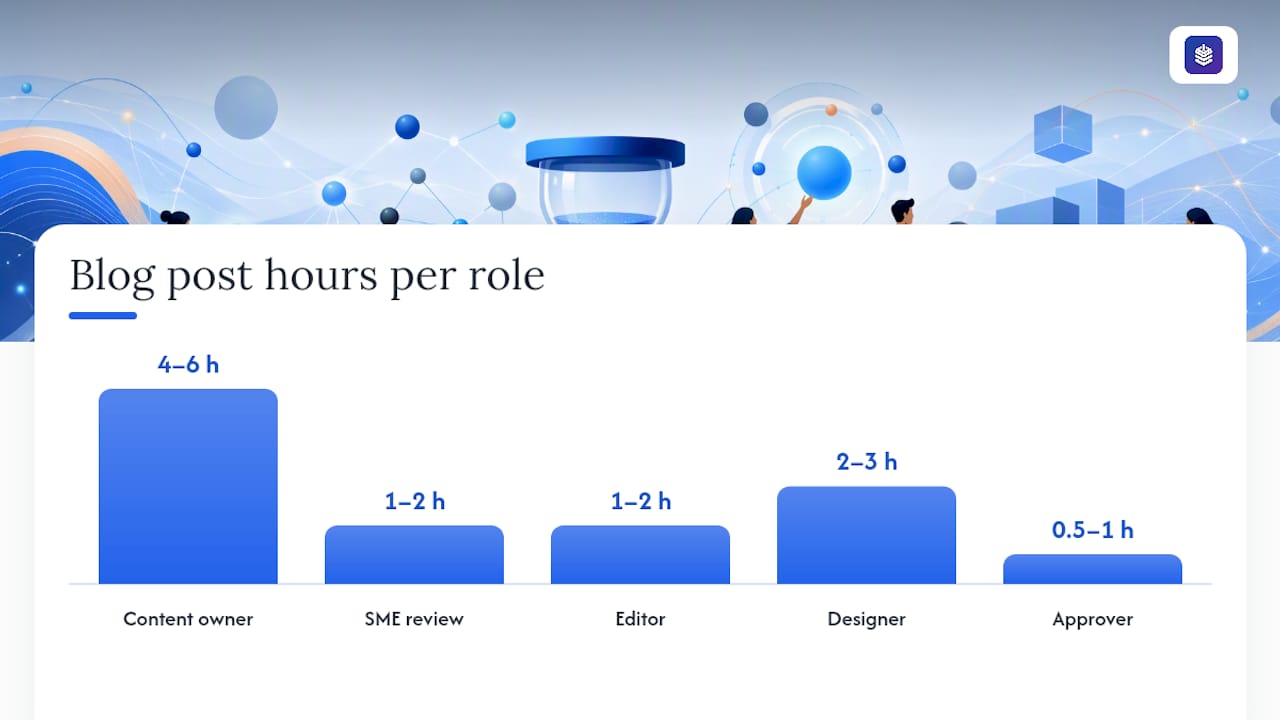
Use this table as a starting point, then adjust based on your team's actual output data from the previous quarter. The EvergreenFeed editorial calendar guide recommends documenting owner and status fields at minimum so the calendar stays auditable.
For outsourced work, add a "Vendor" field and a "Brief sent" date to the entry. Freelancers need the same 48–72 hour review buffer as internal contributors.
Review and approval SLA checklist:
- Draft delivered to editor: 3 business days before publish date
- Editor returns feedback: within 24 hours of receipt
- SME review completed: 48 hours before publish date
- Final approver sign-off: 24 hours before publish date
- Assets (images, graphics) delivered: same day as final draft
How do you choose a content mix and cadence that lasts?
Pillar-based planning is the most reliable structure for a sustainable content mix. Pick three to five pillars, then define two to four content formats per pillar. A B2B SaaS team might run pillars like "SEO and organic growth," "product education," and "industry trends," each served by long-form posts, short social clips, and a monthly email digest.
The cadence rule that holds up in practice: publish at a frequency you can sustain for six months without adding headcount. For most teams, that means one to two long-form pieces per week, not five. B2B content strategies that concentrate on canonical depth and consolidating thin content consistently outperform volume-first approaches for pipeline influence.
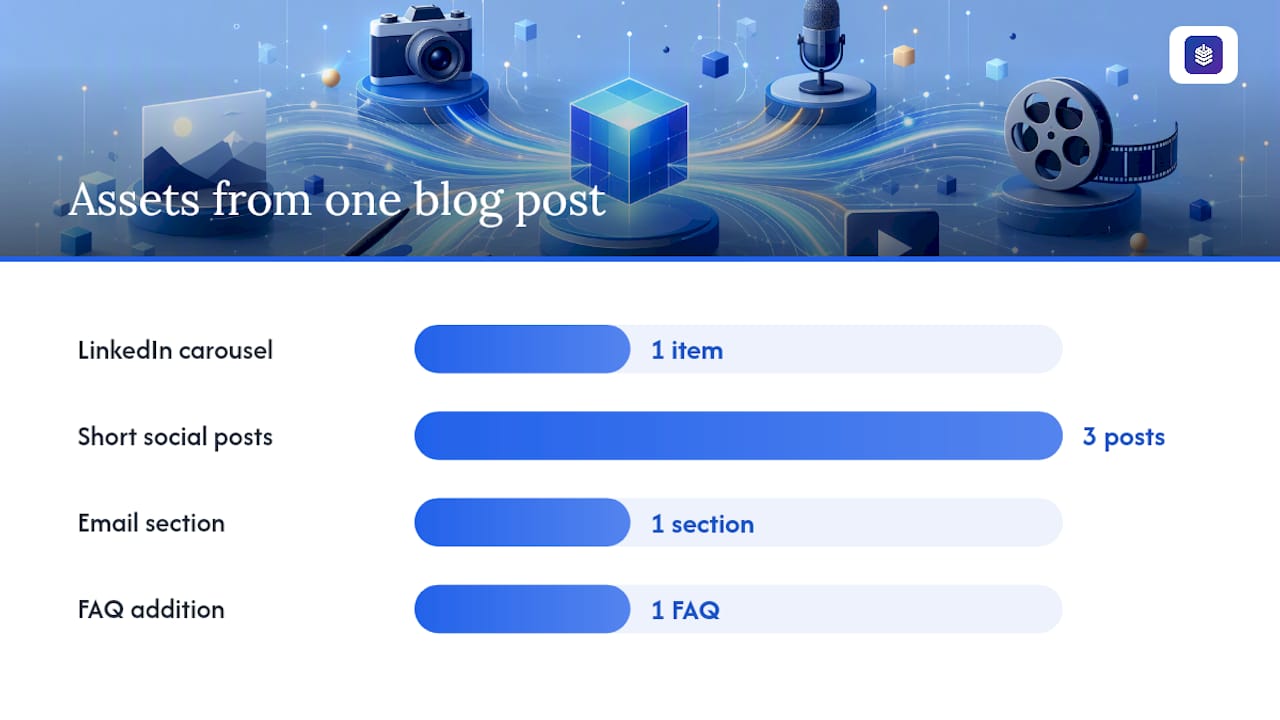
A repurposing matrix extends every asset's reach without proportional effort. One 1,500-word blog post can yield a LinkedIn carousel, three short social posts, one email section, and a FAQ addition. Build this into the calendar entry itself so the distribution lead knows what to create before the post publishes.
Sample weekly cadence:
- Monday: publish long-form blog post (pillar 1 or 2)
- Wednesday: publish short-form or product-focused post (pillar 3)
- Thursday: social set goes live (repurposed from Monday's post)
- Friday: email digest scheduled (includes Wednesday's post)
Content mix checklist:
- At least one awareness-stage piece per pillar per month
- At least one consideration or decision-stage piece per pillar per month
- One canonical "depth" page per owned problem, refreshed quarterly
- A holding slot each month for reactive or opportunistic content
Pro Tip: When two posts cover the same topic at different depths, merge them into one canonical page rather than publishing both. Schedule the merge as a calendar task with the same priority as net-new content. Thin, overlapping posts split ranking signals and dilute authority.
As Storyflow's complete content calendar guide notes, defining pillars and cadence before filling in specific dates and titles prevents the calendar from becoming a random list of ideas with no strategic thread.
What fields should every calendar entry include?
A minimal viable entry prevents chaos later. According to the EvergreenFeed editorial calendar management guide, the fields that keep a calendar usable and auditable are: working title, pillar, format, owner, status, publish date, primary goal, and CTA. For 2026, add three more.
Recommended field set
| Field | Purpose | Example value |
|---|---|---|
| Working title | Identifies the piece | "How to write a product description that ranks" |
| Pillar | Links to strategic theme | SEO and organic growth |
| Format | Sets production expectations | Long-form blog post |
| Buyer-journey stage | Balances the mix | Awareness |
| Business objective | Makes outcomes traceable | Increase organic traffic |
| CTA | Aligns with funnel goal | Start free trial |
| Owner | Assigns accountability | Jordan (content lead) |
| Production start | Triggers workflow | March 3 |
| Review date | Enforces SLA | March 10 |
| Publish date | Final deadline | March 12 |
| SEO target keyword | Guides on-page optimization | "product description SEO" |
| AI-source flag | Governance for AI-assisted drafts | AI-assisted / Human-written |
| Status | Tracks progress | In review |
Recommended views for your calendar tool:
- Grid by publish date (default production view)
- Board by status (Kanban: Briefed / In draft / In review / Scheduled / Published)
- Calendar by month (stakeholder-facing overview)
- Filtered by pillar or business objective (for sprint reviews)
Governance checklist:
- Agree on a naming convention for working titles before populating (e.g., "[Pillar] — [Topic] — [Format]")
- Use a consistent tag taxonomy for pillars, formats, and buyer stages
- Archive published entries rather than deleting them so the audit trail stays intact
- Review the AI-source flag column monthly to track the ratio of AI-assisted to fully human content
Understanding how AI keyword tools work helps you populate the SEO target keyword field with data-backed choices rather than guesses.
Which tool should you use for your editorial calendar in 2026?
The right tool depends on your team size, workflow complexity, and where your content actually lives. Here is a practical breakdown:
- Google Sheets or Notion — best for solo marketers or small teams (under five people) who need a free, flexible starting point with no learning curve. Sheets handles simple grids well; Notion adds linked databases and status boards. Neither offers native automations or publishing integrations.
- Airtable — the right step up for mid-sized teams (five to twenty people) that need structured views, automations, and template imports. Airtable's free editorial calendar templates are organized by use case and ready to import, which cuts setup time significantly.
- Cision — built for PR and communications teams managing media relations, key-date coverage, and campaign timelines alongside content. The Cision 2026 PR and comms content planning calendar gives PR teams a date grid with campaign inspiration baked in.
- Blockpress — the right choice for Shopify merchants who want their editorial calendar, AI drafting, SEO keyword data, and scheduled publishing in one place without stitching together separate apps. More on this below.
Checklist for evaluating any 2026-ready editorial calendar tool:
- Native AI integration or AI-source flagging
- Live SEO signals or keyword data at the entry level
- Scheduling and autopublish capability
- Per-article analytics or performance tracking
- Role-based access and approval workflows
- Data portability (CSV export or API)
Understanding the strategic role of content calendars helps you evaluate tools against your actual workflow needs rather than feature lists alone.
What 2026 trends should you bake into your editorial calendar?
Four research-backed trends should change how you design your calendar this year.
AI tooling is the top budget priority. The CMI 2026 B2B Content and Marketing Trends report found that 45% of B2B marketers plan to increase investment in AI-powered tools, ahead of events (33%) and owned media (32%). That budget shift means your calendar needs an AI-source flag field and a governance policy before your team scales AI-assisted drafting.
Content structured for AI extraction gets cited more. AI engines like ChatGPT and Perplexity pull answers from content with clear question-shaped headers and standalone facts. If your posts bury the answer in paragraph three, they are less likely to be cited. Structuring content for AI search optimization is now a calendar-level decision, not just a writing-level one.
Repurposing is the highest-ROI production activity. Teams that build repurposing tasks directly into calendar entries, rather than treating them as afterthoughts, get more distribution from the same production budget. Add a "Repurpose to" field to each entry and assign it at the brief stage.
Measurement must connect to pipeline. Tracking page views alone no longer justifies content investment. B2B programs that tie content to CRM touchpoints and pipeline influence get more budget and more stakeholder trust.
Template changes to make this week:
- Add an "AI-source flag" field (values: AI-assisted, Human-written, AI-reviewed)
- Add a "Citation-ready fact" field for the single most quotable claim in each piece
- Schedule a quarterly citation audit to check which pieces are being referenced by AI engines
- Add a "Repurpose to" field with checkboxes for social, email, and video
Pro Tip: Write at least one standalone, citation-ready sentence per post, formatted as a direct answer to the post's primary question. Place it in the first 200 words. AI engines extract from the top of content first, and a clearly stated fact increases the chance your content becomes a cited source.
How do you measure editorial calendar success and iterate?
Measurement works best when KPIs are assigned at the entry level, not evaluated after the fact. Map your core metrics to the business objective each piece was built to serve.
KPI sets by objective:
- Awareness: organic impressions, new users, branded search volume
- Lead generation: form completions, content downloads, email sign-ups attributed to content
- SEO: keyword ranking movement, organic click-through rate, backlinks earned
- Conversion influence: content touchpoints in closed deals (CRM attribution), assisted conversions
Measurement cadence:
- Weekly: production check (are pieces on track? any blockers?)
- Monthly: channel performance review (which posts drove traffic, leads, or engagement?)
- Quarterly: pillar health audit (which pillars are performing? which need pruning or consolidation?)
Measurement checklist:
- Tag every piece of content with its business objective in your analytics platform
- Connect content UTMs to your CRM so you can track content-influenced pipeline
- Review the bottom 20% of posts by organic traffic each quarter and decide: refresh, merge, or retire
- Track keyword ranking movement for every SEO-targeted entry 30 and 90 days after publish
Content scoring frameworks give you a structured way to prioritize which pieces to refresh versus retire during quarterly audits, rather than relying on gut feel.
For B2B programs, connecting content outcomes to CRM data is the single most effective way to demonstrate content's contribution to revenue. Even a simple UTM-to-deal mapping in Salesforce or HubSpot shows which posts appear in the buyer journey of closed accounts.
What actually makes an editorial calendar work in practice?
The most common failure mode is not a bad template. It is a calendar that gets populated in a planning session and then ignored for six weeks until someone notices the publish queue is empty.
The habit that prevents this is a weekly 20-minute calendar review, not a full team meeting, just one person scanning the next two weeks for missing owners, overdue drafts, and entries still labeled "TBD." Pair that with a single SLA for stakeholder feedback (48 hours, no exceptions) and most production bottlenecks disappear before they become missed publish dates.
The other thing worth saying plainly: a calendar with 40 entries and no business objectives attached is not a strategic asset. It is a to-do list. The moment you add an "Audience Stage" and "Business Objective" column to every entry, the calendar starts generating useful data. After one quarter, you can see which pillars are underserved, which formats are overrepresented, and which objectives have no content supporting them. That visibility is what turns planning into iteration.
Blockpress gives Shopify merchants an integrated editorial calendar and AI blog editor
Shopify merchants managing a blog alongside a store typically juggle three separate tools: a content calendar, an AI drafting app, and an SEO plugin. Blockpress replaces all three with a single editor built directly into Shopify.
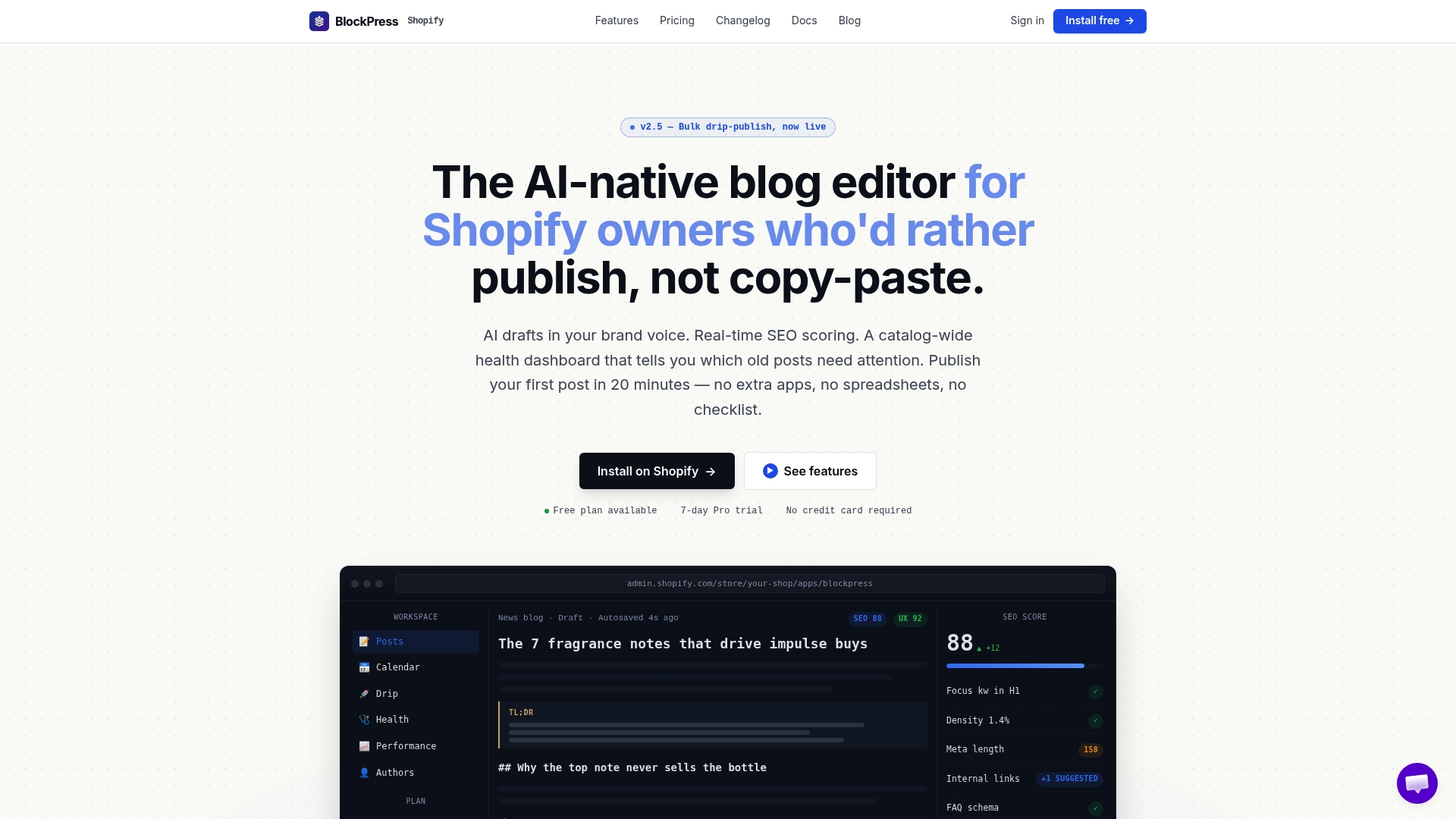
Inside Blockpress, you get real Google keyword data at the entry level, live SEO and UX scoring as you write, AI-generated drafts in your brand voice, bulk drip-publishing, article health audits, and per-article performance analytics. The scheduled publishing calendar means your editorial plan and your publish queue are the same thing, with no export or sync required. For Shopify merchants who want to implement the calendar best practices in this article without leaving their store, Blockpress is the most direct path. See the pricing plans or explore the full feature set to evaluate whether it fits your workflow.
Sources
The resources below are directly referenced in this article. Each is free to access or download.
- 7 Steps to a More Strategic Editorial Calendar
- 12 Free Editorial Calendar Templates for 2026
- What is a Content Calendar? The Complete Guide (2026) | Storyflow
- Master Editorial Calendar Management: 2026 Guide - EvergreenFeed Blog
FAQ
What fields should every editorial calendar entry include?
At minimum, each entry needs a working title, pillar, format, owner, status, publish date, primary business objective, and CTA. For 2026, also add a buyer-journey stage, SEO target keyword, and AI-source flag.
How often should you review and update your editorial calendar?
Run a 20-minute production check weekly, a channel performance review monthly, and a full pillar health audit quarterly. The quarterly sprint review is where you prune, consolidate, and re-prioritize.
What is the best editorial calendar tool for Shopify merchants?
Blockpress is built directly into Shopify and combines a scheduled publishing calendar, AI-generated drafts, live SEO scoring, and per-article analytics in one editor, eliminating the need for separate calendar and SEO apps.
How do you set a sustainable content cadence?
Choose a publishing frequency your team can maintain for six months without adding headcount, then hold it. For most teams, one to two long-form posts per week is more sustainable and more effective for SEO than a higher volume of shorter, thinner content.
Why should you add an AI-source flag to your editorial calendar?
The CMI 2026 B2B Content and Marketing Trends report shows 45% of B2B marketers are increasing AI tool investment this year. An AI-source flag gives you governance visibility over which pieces were AI-assisted, supporting quality control and editorial accountability as AI drafting scales.