
Shopify natively supports only one author per blog post, and that author must be a store owner or staff account. To run a real multi author Shopify blog, you have two practical paths: build custom metafields with theme edits for a scalable, schema-safe setup, or install a dedicated author app if you have no developer on hand. Staff accounts work only for very small internal teams, since seat costs and permissions risk pile up fast.
TL;DR:
- Using metafields for author information offers a scalable, SEO-friendly solution that avoids staff seat costs and security risks associated with multiple staff accounts.
- Proper setup requires creating metafield definitions, editing theme templates with fallback logic, and validating JSON-LD schema to ensure search engines correctly attribute authorship.
- Author apps simplify implementation without coding but introduce recurring costs and potential reliability issues, making them suitable for small-scale or non-technical stores.
- Maintaining current author bios, images, and schema data is essential for SEO and reader trust, especially when involving rotating guest contributors.
- Linking content management to an external CMS is advisable only at large scales, as metafields and dedicated apps effectively serve most growing Shopify stores.
Table of Contents
- Multi Author Shopify Blog Options: Staff Accounts, Metafields, Apps, and Hardcoding
- How Do You Set Up Author Metafields in Shopify?
- What Do No-Code Author Apps Actually Do?
- Do Multiple Authors on One Post Affect SEO?
- How Do You Manage Permissions for Multiple Blog Contributors?
- Why BlockPress Handles This Differently
- Step-by-Step Metafield Setup and Safe Fallback Logic, Revisited
- Designing the Reader Experience Around Multiple Authors
- Which Shopify Stores Run Successful Multi-Author Blogs?
- Can You Connect Shopify to an External CMS for Multi-Author Publishing?
- Metafields Beat Apps for Most Growing Blogs
- Manage Every Author's Bio, SEO Score, and Byline in One Place
- Sources
- FAQ
Multi Author Shopify Blog Options: Staff Accounts, Metafields, Apps, and Hardcoding
Every store facing this problem lands on one of four routes, and the right one depends on your team size, technical comfort, and how much you care about search visibility.
- Staff accounts: Shopify's built-in method. Each contributor gets a login, and their name becomes the post's author. It's the only option Shopify supports out of the box, but it means paying for a staff seat per writer and granting admin-level access to people who only need to write blog posts.
- Metafields plus theme edits: You create custom fields for author name, bio, and avatar, then edit your theme's Liquid code to display them. This is the most scalable and SEO-friendly option, but it takes some developer time upfront.
- Author apps: No-code tools from the Shopify App Store that add custom byline fields and author pages without touching theme code. Fast to set up, but they add a recurring monthly cost and depend on the vendor staying reliable.
- Hardcoded bylines: Typing "By Jane Smith" directly into the post body as plain text. It's the simplest fix and costs nothing, but it's invisible to structured data and breaks the moment you need to update an author's bio across dozens of posts.
If you have any developer access at all, metafields is the option to build toward.
How Do You Set Up Author Metafields in Shopify?
Metafields let you attach structured author data to every blog post without creating a new staff login for each writer. Shopify store owners can build this using the theme editor and a bit of Liquid. It's the foundation most professional multi-author setups run on.
- Create the metafield definitions. Go to Settings > Custom data > Blog posts, and add fields for
author_name,author_url,author_bio, andauthor_avatar. Use single-line text for name and URL, multi-line text for bio, and a file reference for the avatar image. - Edit your theme's article template. Open the Liquid file that renders your blog post byline (usually inside
article-template.liquidor a snippet likeblog-post-meta.liquid) and reference the new metafields directly. - Add a safe fallback. Wrap the metafield output in a conditional so posts without a custom author still display correctly: check if
article.metafields.custom.author_nameexists, and if not, fall back to{{ article.author }}. This keeps older posts from showing a blank byline. - Update your Article JSON-LD schema. Map the same metafield values into your structured data block, choosing
Personfor named human writers andOrganizationfor house-brand bylines. If you only update the visible byline text and skip the JSON-LD, search engines and AI retrievers may still attribute the post to the original staff user, which makes the whole exercise cosmetic. - Test three scenarios before publishing. Preview a post with the metafield filled in, a post that has no metafield set (confirming the fallback works), and run both through your staging theme. Only then push to production.
- Back up your theme and document every change. Duplicate the live theme before editing, and keep a short changelog of which files and snippets you touched, so a rollback takes minutes instead of hours.
Pro Tip: Store your metafield namespace consistently (something like custom or jsonld) so the same field can feed both the visible byline and the schema output without duplicating data entry for every post.
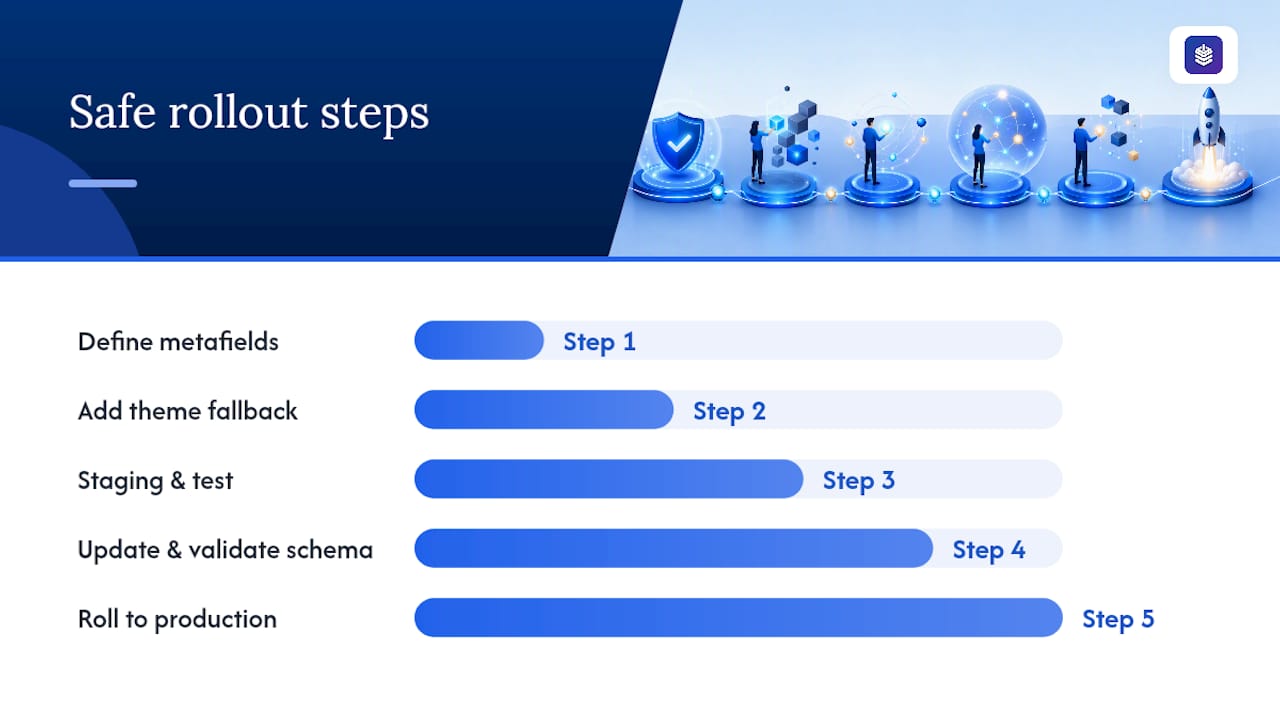
A safe rollout follows a fixed sequence: add the metafield definitions, update the theme with fallback logic, deploy to staging and test, update the schema and validate it, then roll forward to production. Skipping the staging step is the single most common way this breaks live.
What Do No-Code Author Apps Actually Do?
Author apps solve the same problem as metafields without asking you to touch a line of code. They install like any other Shopify app, hook into your theme through the app embed system, and give you a settings panel where you type in each contributor's name, bio, and photo instead of editing Liquid files. Tools like Hyve's Custom Blog Authors are built specifically for this use case, and most competitors in that category offer similar functionality for a small monthly fee.
A typical app gives you:
- Custom byline fields separate from the staff account system
- Author bio blocks that render under each post
- Avatar image support
- Automatic Article schema output tied to each byline
- A dedicated author listing page for each contributor
Setup usually takes fifteen minutes: install the app, grant it theme permissions, map its fields to your existing blog template, publish the author page template it generates, then run a Rich Results Test to confirm the schema is firing correctly.
Cost is the tradeoff. Most author apps charge a recurring fee, though many offer free trials. Reliability matters here too, since your byline data now lives inside a third-party app rather than your own theme files. An app makes sense when you have no developer resource, work with a rotating cast of guest contributors, or want polished author pages without building them yourself. If you have any theme access and plan to scale past a handful of writers, metafields still give you more long-term control.
Do Multiple Authors on One Post Affect SEO?
Yes, but mostly in a good way, provided your structured data actually matches what's on the page. Visible bylines and structured author profiles reinforce the experience, expertise, authoritativeness, and trust signals search engines look for, which strengthens how ecommerce blogs perform in organic search over time.
The risk isn't having multiple authors. It's having a visible byline that says one thing while your JSON-LD Article schema says another, or missing the schema entirely.
- Include
name,url, andsameAs(linking to an author's social profiles or bio page) inside thePersonschema for named writers - Use
Organizationschema instead when a post is published under a house brand rather than an individual - Validate every template change with Google's Rich Results Test before rolling it out site-wide
- Run pages through a Schema Markup Validator as a second check, then spot-check how the listing appears in search results
- Watch for the most common failure: a theme edit that changes the visible name but leaves the old author's data sitting untouched in the JSON-LD block
| Signal to check | Where it lives | What to verify |
|---|---|---|
| Visible byline | Blog post template | Name matches intended contributor |
| Author schema type | JSON-LD Article block | Person for individuals, Organization for house bylines |
| sameAs links | JSON-LD Person object | Point to a real, live author profile |
| Fallback behavior | Liquid template logic | Posts without metafields still render a name |
How Do You Manage Permissions for Multiple Blog Contributors?
Handing out staff accounts to every guest writer is the fastest way to end up with an admin panel full of logins nobody remembers granting. Each account costs a paid seat, and each one is a door into your store's backend that a contributor who only needed to write a post probably didn't need.
- Grant minimal permissions. Give contributor accounts access only to the Blog Posts section, never full admin, product, or financial permissions.
- Audit staff accounts quarterly. Remove access for anyone who hasn't published in the last few months, and confirm every remaining account still needs its level of access.
- Budget for seats before onboarding writers. Know your Shopify plan's staff limits and costs before you promise someone a login.
- Standardize your intake process. Use a short contributor form covering bio, headshot, and a canonical author slug so every new writer's metafield or app profile gets set up the same way, then track deadlines on a shared editorial calendar.
Why BlockPress Handles This Differently
Multi-author bylines and their schema tend to drift apart over time, mostly because most stores maintain them by hand across separate tools: one app for the byline, one plugin for schema, one spreadsheet for tracking who wrote what. That fragmentation is where the "visible name updated, schema still wrong" failure mode comes from, and it's avoidable.
BlockPress is an AI-native blog editor built directly into Shopify. It gives you real Google keyword data, live SEO and UX scoring, AI-generated drafts, bulk drip-publishing, article health audits, and author bio pages inside one editor, so contributor data and schema output stay tied to the same source instead of three disconnected tools.
Step-by-Step Metafield Setup and Safe Fallback Logic, Revisited
The setup steps above cover the mechanics. What trips up most teams isn't the metafield creation itself, it's the fallback logic and the order of operations around it.
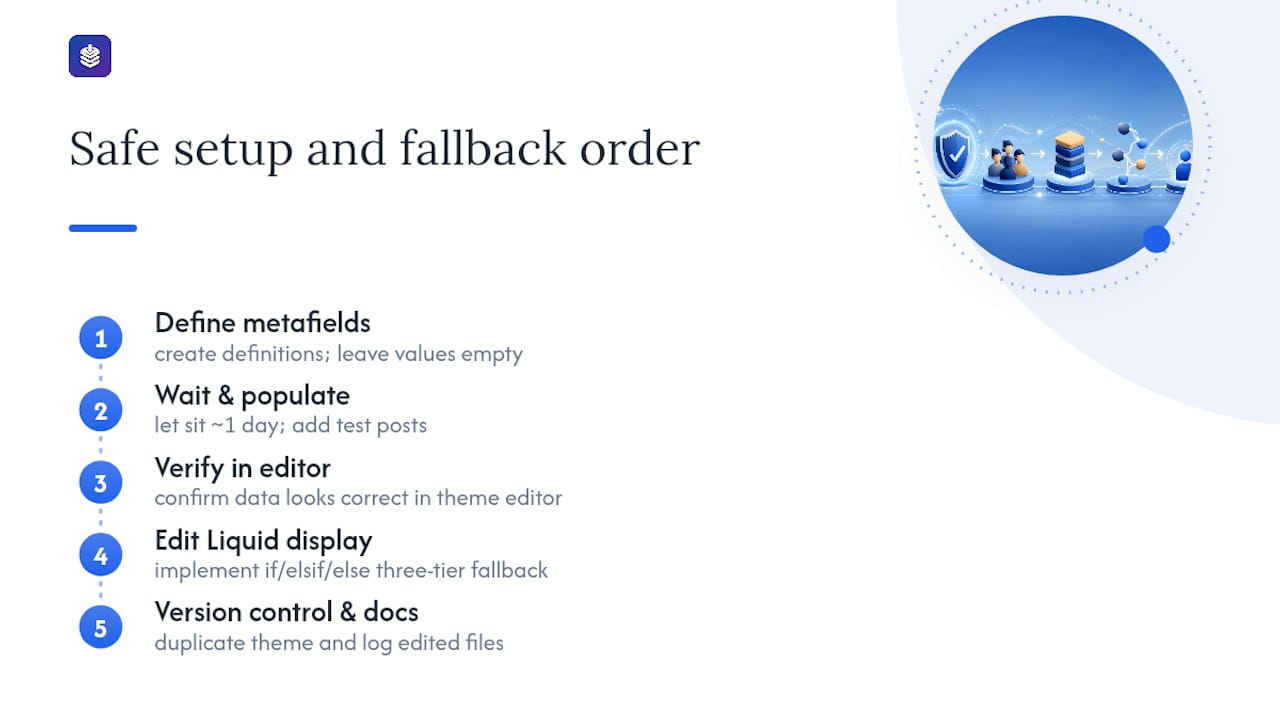
Build your fallback chain with three tiers, not two. First, check for the metafield value. Second, if that's empty, fall back to the native {{ article.author }} staff name. Third, if somehow neither exists (rare, but it happens with imported posts), fall back to a store-level default like "Editorial Team" so no post ever ships with a blank byline. Nesting these as a simple if/elsif/else chain in Liquid keeps the logic readable for whoever maintains the theme after you.
Timing matters more than most guides admit. Add the metafield definitions first, then let them sit empty for a day while you populate a handful of test posts. Only after confirming the data looks right in the theme editor should you touch the live Liquid template. Editing the display logic before the data exists is how stores end up debugging a blank byline in production instead of on staging.
Version control isn't optional here, even for a Liquid-only change. Shopify's theme editor keeps some history, but duplicating your live theme before every edit gives you a true one-click rollback if the fallback logic breaks something on a post type you didn't test. Document which files you touched, in a shared doc or even a code comment, so the next person editing the theme isn't reverse-engineering your logic from scratch six months later.
Designing the Reader Experience Around Multiple Authors
A byline is only useful if a reader can act on it. If your blog has five regular contributors, each writing in a different voice or covering a different product category, readers benefit from being able to tell at a glance who wrote what and why that person's take matters.
Put the byline and a small avatar near the top of the post, not buried in a footer nobody scrolls to. Link the author's name to a bio page that shows their expertise and a list of their other posts, since that's the same "author archive" pattern that established publishers like recipe sites and news outlets use to build reader trust in a specific contributor over time.
Keep the visual treatment consistent across every post template your blog uses, including any custom layouts for video posts or gated content, so a byline doesn't disappear on the one template someone forgot to update. If you're using guest contributors alongside in-house staff, consider a small visual tag distinguishing "Guest Contributor" from your core team, since readers often weigh in-house expertise differently than a one-off guest post.
Mobile matters more than desktop for most Shopify blogs. Test that the author block doesn't push your actual content below the fold on a phone screen, and that tapping an author's name doesn't require a second, slower page load before the bio renders.
Which Shopify Stores Run Successful Multi-Author Blogs?
Stores that treat their blog as a real content operation, rather than an occasional marketing afterthought, tend to share the same pattern: a rotating set of named contributors, each with a distinct area of coverage, and bylines that are visually consistent across every post.
Beauty and wellness brands frequently run multi-author setups where in-house estheticians or nutritionists each write under their own name, giving the content a credibility boost that a single generic "Team" byline can't match. Outdoor and sporting goods stores often do the same with staff who have relevant certifications, since a byline from a certified trainer or a licensed guide carries more weight on a buying-guide post than an anonymous brand voice.
The common thread across stores that pull this off well isn't the platform they used to build it, it's the discipline of keeping every contributor's bio, avatar, and schema data current as staff turn over. A blog with six bylines but only two active bio pages looks worse to both readers and search engines than a blog with one consistent, well-maintained author voice.
Can You Connect Shopify to an External CMS for Multi-Author Publishing?
Some stores outgrow Shopify's native blog entirely and route content through an external CMS, then publish or syndicate into Shopify via API or a headless setup. This makes sense for larger content teams that need workflow features Shopify's blog editor doesn't offer natively, like multi-stage approval chains or a dedicated content calendar with role-based permissions.
The tradeoff is real integration overhead. You're now maintaining two systems, mapping author metadata between platforms, and making sure schema output stays consistent whether a post originated in the external CMS or directly in Shopify. For most stores publishing a handful of posts per week, this complexity isn't worth it, since a well-built metafield system or a dedicated app already covers the same ground without a second platform to maintain.
Where external integration earns its keep is at genuine scale, dozens of contributors, multiple brand blogs feeding into one Shopify storefront, or a content team that already has an established CMS workflow they don't want to abandon. If you're at that scale, plan the metafield-to-CMS mapping before migrating a single post, not after.
Metafields Beat Apps for Most Growing Blogs
The conventional advice treats staff accounts, apps, and metafields as roughly equal options to pick based on preference. They aren't. Staff accounts are a stopgap that quietly turns into a security and billing problem the moment you pass three or four regular contributors, and hardcoded bylines are barely a solution at all since they're invisible to schema.
Where most guides undersell the real work is the schema half of the job. Anyone can add a visible byline in an afternoon. Making sure that byline's Person or Organization data actually matches what's in your Article JSON-LD, and validating it instead of assuming it worked, is the step that determines whether the effort helps your SEO or just looks nicer to human readers. Skip that step and you've done cosmetic work with a technical price tag.
If you're choosing where to spend your first hour on this, spend it setting up the metafield structure and its fallback logic correctly, not picking an app or perfecting your author bio copy. Get the data model right first. Everything else, including which tool renders it, is a decision you can revisit later without breaking anything.
— Rodney
Manage Every Author's Bio, SEO Score, and Byline in One Place
Running a metafields-first setup gives you control, but it also means maintaining author data, schema, and SEO scoring across separate tools unless your editor handles all three natively. BlockPress builds author bio pages, live SEO and UX scoring, and structured publishing directly into its Shopify editor, so a contributor's byline, bio, and schema output stay tied to one source instead of drifting apart across a theme edit here and an app update there.
That matters most once you're past two or three contributors and start caring whether each post's Article schema actually reflects who wrote it. BlockPress's feature set includes AI-generated drafts in your brand voice, bulk drip-publishing for scheduling contributor content in advance, and per-article health audits that flag exactly the kind of schema mismatch that quietly hurts a multi-author blog's search performance. If you're setting up author pages for the first time or migrating away from a patchwork of apps, start a trial and map your first few contributor profiles directly inside the editor.
Sources
- Changing authors for blog — community implementation discussion
- Hyve ‑ Custom Blog Authors
- Shopify help: staff accounts and permissions
- Ecommerce Blog SEO - EcomSEO Academy | EcomSEO
FAQ
Can Shopify blog posts have more than one author natively?
No. Shopify's built-in blog editor supports only one author field per post, and that author must be a store owner or staff account.
What's the best way to add multiple authors without creating staff logins?
Custom metafields for author name, bio, and avatar, combined with theme edits and updated JSON-LD schema, give you unlimited bylines without paying for extra staff seats. Tools like BlockPress bundle this author bio and schema management directly into the editor if you'd rather avoid manual theme edits.
Do author apps hurt my Shopify blog's SEO?
Not if configured correctly. A quality author app outputs proper Article schema automatically, but you should still validate it with a Rich Results Test after setup.
How many staff accounts should a small store create for guest writers?
As few as possible. Staff accounts carry seat costs and admin-level access risk, so they work best for a handful of core team members rather than rotating guest contributors.
Does changing a blog post's visible author update its SEO schema automatically?
No. Updating the visible byline text alone leaves the JSON-LD Article schema pointing at the old author unless you also update the structured data manually.