
TL;DR:
- On-page SEO mistakes like uncontrolled faceted navigation, duplicate content, and weak internal linking harm ecommerce search rankings. Fixing these issues through proper management, unique content, and optimized internal links can significantly improve visibility and conversions. Prioritizing site structure and metadata optimizations leads to faster improvements and better long-term results.
Common on-page SEO mistakes in ecommerce blogs are the leading cause of poor search rankings, low organic traffic, and missed revenue. These errors fall under what SEO professionals call "on-page optimization," which covers everything from metadata and content quality to internal linking and page speed. Tools like Google Search Console and Core Web Vitals reveal these problems clearly, yet most store owners never look. Fix the right issues in the right order, and you will see measurable gains in both rankings and conversions.
1. common on-page SEO mistakes: uncontrolled faceted navigation
Faceted navigation is the filter system on ecommerce sites that lets shoppers sort by size, color, price, and brand. Left uncontrolled, it is one of the most damaging technical SEO mistakes in blog posts and product catalogs alike.

The math is brutal. Five filter categories with ten options each can generate millions of low-value URLs that Google wastes crawl budget on. That budget is finite. When Google spends it on /products?color=red&size=M&sort=price, it skips your best category pages and blog posts.
Here is what to do:
- Use robots.txt to block crawling of parameter-based URLs upfront. This saves crawl budget before Google even visits those pages.
- Add noindex meta tags to filtered pages you want Google to skip from the index after crawling.
- Set canonical tags on variant pages pointing to the clean parent URL.
Note that canonicals alone do not save crawl budget. They signal your preferred URL, but Google still crawls the variants. Robots.txt is the only tool that stops the crawl at the door.
Pro Tip: Monitor Google Search Console's Coverage report monthly. If you see thousands of "Crawled, currently not indexed" URLs, faceted navigation is likely the cause.
2. duplicate and manufacturer-provided product descriptions
Between 68% and 78% of ecommerce sites use manufacturer-provided product descriptions. That means your content is identical to dozens of other stores selling the same product. Google does not reward duplicate content. It simply picks one version to rank, and it is rarely yours.
The same problem appears in blogs. A 600-word post that restates existing content offers no information gain and gets penalized by Google's Helpful Content System. Google rewards content that teaches something new, answers a specific question, or provides a perspective not found elsewhere.
What works instead:
- Write unique product descriptions of 200–500 words focused on benefits and real use cases, not spec lists.
- Add original research, customer quotes, or firsthand testing notes to blog posts.
- Cover angles competitors skip, such as "who should NOT buy this product" or "how this compares after 6 months of use."
Pro Tip: Run your product descriptions through a plagiarism checker like Copyscape before publishing. If your content matches a manufacturer's page, rewrite it entirely before it goes live.
3. weak or missing internal linking
Weak internal linking is a structural flaw that leaves your best content invisible to both Google and shoppers. Every product page should be reachable within three clicks from the homepage. Most ecommerce blogs fail this test badly.
Blog posts that live in isolation fail to connect readers to commercial paths. A post about "how to choose a running shoe" that never links to your running shoe collection is a missed opportunity on two levels: SEO authority and revenue.
Good internal linking follows these rules:
- Link blog posts to related product pages and collections using descriptive anchor text, not "click here."
- Link product pages back to supporting blog content to build topical authority clusters.
- Aim for 3–7 internal links placed naturally within the first half of each post.
- Avoid generic anchor text. "Best trail running shoes for beginners" beats "learn more" every time.
For a deeper look at building these structures on Shopify, the Shopify internal linking guide from Blockpress covers what works and what does not at scale.
4. page speed and mobile optimization errors
Slow pages kill rankings and sales at the same time. Every 100ms delay on mobile drops conversion rates by 8%. That is not a minor inconvenience. It is a direct tax on your revenue for every visitor who waits.
Google's Core Web Vitals measure three things: Largest Contentful Paint (LCP), Interaction to Next Paint (INP), and Cumulative Layout Shift (CLS). Poor scores on any of these push your pages down in rankings, especially on mobile where most ecommerce shopping now happens.
Fix the biggest offenders first:
- Compress and lazy-load images. Unoptimized images are the single largest contributor to slow LCP scores.
- Minimize JavaScript. Unused JS delays page interactivity and hurts INP scores directly.
- Use a CDN. Content delivery networks reduce server response times for global visitors.
- Test with PageSpeed Insights and Google Search Console's Core Web Vitals report monthly, not just at launch.
5. metadata mismanagement and missing schema markup
Metadata errors are among the most common on-page SEO errors because they are invisible to the naked eye but highly visible to Google. Title tags and meta descriptions control your click-through rate from search results. Get them wrong, and even a page ranking on page one will underperform.
Here is how good metadata compares to bad:
| Element | Wrong Approach | Right Approach |
|---|---|---|
| Title tag | "Products | My Store" |
| Meta description | Keyword stuffed or blank | Unique, benefit-focused, under 160 characters |
| Schema markup | None | BlogPosting + FAQPage where relevant |
Title tags should start with the primary keyword within the first 40 characters and be unique across every page. Misleading meta descriptions increase bounce rates and send negative signals to Google. Write them to match what the page actually delivers.
Structured data like BlogPosting and FAQPage schema increases the chance of rich results in search, which directly improves click-through rates. FAQ schema is especially valuable for question-driven blog content, where a featured snippet or expandable FAQ result can double your organic clicks.
Pro Tip: Use Google's Rich Results Test tool to verify your schema is valid before publishing. Invalid markup gets ignored entirely.
Key takeaways
Fixing on-page SEO errors in ecommerce blogs requires addressing faceted navigation, content quality, internal linking, page speed, and metadata in a coordinated way, not in isolation.
| Point | Details |
|---|---|
| Control faceted navigation | Use robots.txt and noindex tags to prevent crawl budget waste from filter URL sprawl. |
| Write original content | Replace manufacturer descriptions and thin posts with unique, benefit-focused content of 200–500 words. |
| Build internal link paths | Connect blog posts to product pages with descriptive anchor text to move authority and readers. |
| Fix Core Web Vitals | Compress images, minimize JavaScript, and monitor LCP and INP scores monthly in Search Console. |
| Optimize metadata and schema | Write unique title tags, accurate meta descriptions, and add BlogPosting or FAQPage schema to every post. |
Where most ecommerce SEO advice gets it wrong
I have reviewed hundreds of ecommerce blogs over the years, and the pattern is almost always the same. Store owners fix one or two visible problems, like updating a title tag or adding a few internal links, and then wait for rankings to recover. They rarely do, at least not quickly.
The reason is that Helpful Content recovery takes months, and Google evaluates quality at the domain level, not the page level. Fixing three posts on a site with 80 thin articles will not move the needle. The whole site's quality ratio matters.
The mistakes I see cause the most damage are not the flashy ones. Faceted navigation index bloat and weak internal linking are both invisible in day-to-day publishing, yet they silently drain crawl budget and link equity for months before anyone notices. I always recommend auditing these two areas first before touching content or metadata.
The fastest wins, in my experience, come from internal linking fixes and metadata rewrites. Both can show ranking movement within four to eight weeks. Content quality improvements take longer but compound over time. Start with structure, then improve content depth, then layer in schema. That sequence works.
— Rodney
Fix these mistakes faster with Blockpress
If you are managing a Shopify blog and want to stop guessing which SEO issues are holding you back, Blockpress was built for exactly this situation.
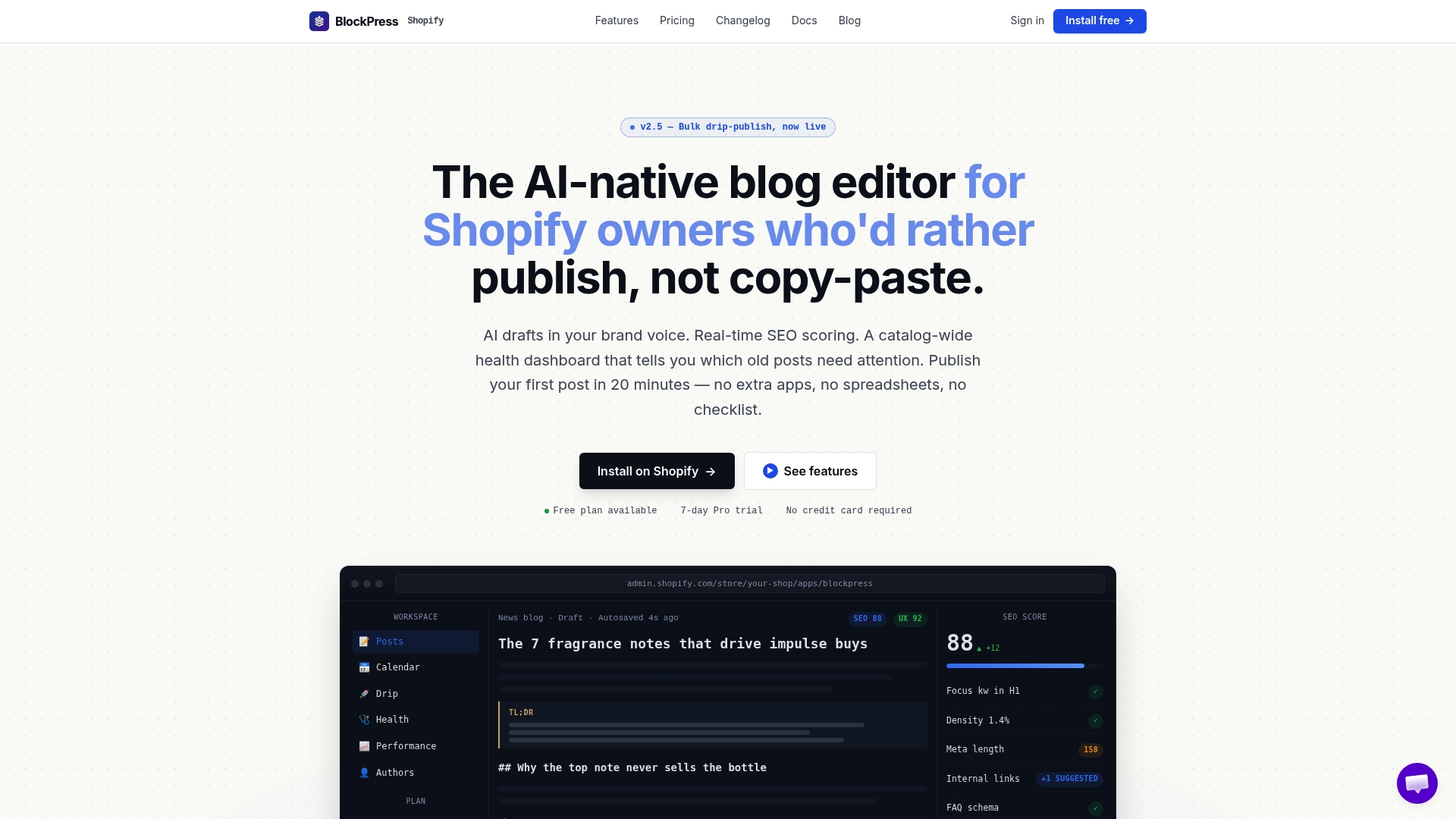
Blockpress is an AI-native blog editor built directly into Shopify. It gives you live SEO and UX scoring as you write, internal linking suggestions, metadata management, article health audits, and per-article performance analytics, all without leaving your store. You get the functionality of three separate apps inside one editor. Store owners who want to fix underperforming blog content without a steep learning curve will find Blockpress the most direct path forward. See the full feature set at blockpress.app.
FAQ
What are the most damaging on-page SEO mistakes for ecommerce blogs?
Uncontrolled faceted navigation, thin or duplicate content, and missing internal links are the three most damaging on-page SEO errors for ecommerce blogs. Each one directly reduces crawl efficiency, content authority, or ranking potential.
How does duplicate content hurt ecommerce blog SEO?
Duplicate content, especially manufacturer-provided descriptions, causes Google to ignore your pages in favor of the original source. Writing unique descriptions of 200–500 words focused on benefits is the standard fix.
Why does internal linking matter for ecommerce blogs?
Internal linking moves authority from high-traffic blog posts to product and category pages, creating clear paths for both Google and shoppers. Pages isolated without internal links rank lower and convert less.
How do core web vitals affect ecommerce blog rankings?
Core Web Vitals measure page speed and stability, and poor scores directly lower Google rankings, especially on mobile. A 100ms delay on mobile reduces conversions by 8%, making speed optimization a direct revenue issue.
Does adding schema markup improve ecommerce blog traffic?
Yes. BlogPosting and FAQPage schema increase the chance of rich results in Google search, which improves click-through rates. FAQ schema is particularly effective for question-based blog content.