
AI keyword tools function as a reasoning and automation layer that sits between raw search data and your content decisions. They ingest keyword indexes, SERP signals, and first-party data from sources like Google Search Console, then apply machine learning models to organize, classify, and prioritize that data at a scale no manual process can match. Tools like Ahrefs, Semrush, and Surfer SEO pair their databases with AI to deliver clustered topic groups, intent labels, and content briefs. Blockpress connects that same verified keyword intelligence directly into a Shopify editorial workflow.
The three moving parts every SEO professional needs to understand:
- Data inputs: keyword indexes, SERP surfaces (autocomplete, People Also Ask, related searches), GSC telemetry, and paid APIs
- Model layer: embeddings for semantic grouping, classifiers for intent labels, and LLMs for brief generation
- Human judgment: strategy, spot-checks, and final sign-off before anything goes to publish
What the tool produces: idea lists, semantic clusters, intent tags (informational, commercial, transactional, navigational), opportunity scores, and content brief headers.
Table of Contents
- What does AI actually add to keyword research?
- How AI keyword tools work under the hood
- What each AI-driven feature actually does
- A repeatable human + AI workflow with copy-ready prompts
- Which tools should you actually use?
- Where AI keyword tools fail
- How to verify AI outputs before you act on them
- What to expect in time and cost
- A practical integration example: Blockpress and verified keyword data
- Key Takeaways
- The gap between what AI promises and what actually matters
- Blockpress brings verified keyword data into your Shopify editor
- Useful sources
- FAQ
What does AI actually add to keyword research?
The honest answer: speed, scale, and pattern recognition that would take a human analyst days to replicate manually. A full manual keyword research cycle — discovery, deduplication, intent sorting, clustering — typically runs 6–8 hours. With AI automation, that same cycle compresses to under 90 minutes of automated processing plus 20–30 minutes of human review.
The biggest practical gains show up in four areas:
- Scale: Generate thousands of keyword variants from a single seed in seconds, not hours.
- Semantic grouping: Embedding models cluster related queries by meaning, not just shared words, so "running shoes for flat feet" and "best sneakers for overpronation" land in the same topic group.
- Intent classification at scale: A classifier can label 5,000 keywords by intent in the time it takes you to manually sort 50.
- Pattern detection: AI surfaces rising queries and long-tail gaps that a manual SERP scan would miss entirely.
Where AI delivers the biggest strategic lift: new-topic discovery for content gaps, long-tail mining for ecommerce product pages, and competitor gap analysis across large keyword sets. Where it delivers the least: final content strategy decisions, brand voice, and any judgment call that requires knowing your audience's specific context.
Pro Tip: Use AI to discover and organize. Use your own judgment to decide what to publish. The moment you let the tool make the final call on topic priority, you've handed your content strategy to a pattern-matching engine that doesn't know your business goals.
How AI keyword tools work under the hood
Understanding the architecture helps you evaluate vendor claims and spot when a tool is overselling its capabilities.
Data sources and freshness
Every AI keyword tool draws from at least one of these four input types:
- Pre-computed keyword indexes (Ahrefs, Semrush, KWFinder): large databases of historical search volume, keyword difficulty, and CPC data. High coverage, but freshness lags by weeks or months for emerging queries.
- SERP-derived discovery (autocomplete, People Also Ask, related searches): live signals pulled directly from Google. A query fan-out pipeline expands one seed across these surfaces to generate hundreds or thousands of real queries that fixed indexes often miss.
- First-party telemetry (Google Search Console, Google Analytics): your own site's click and impression data. The highest-quality signal for prioritization because it reflects actual user behavior on your domain.
- Paid APIs (Google Keyword Planner, DataForSEO): structured volume and CPC data that enriches discovered terms with quantified metrics.
The tradeoff is straightforward: pre-computed indexes offer broad coverage but slower freshness; SERP-native discovery is real-time but requires enrichment to get volume and difficulty scores.
Model components
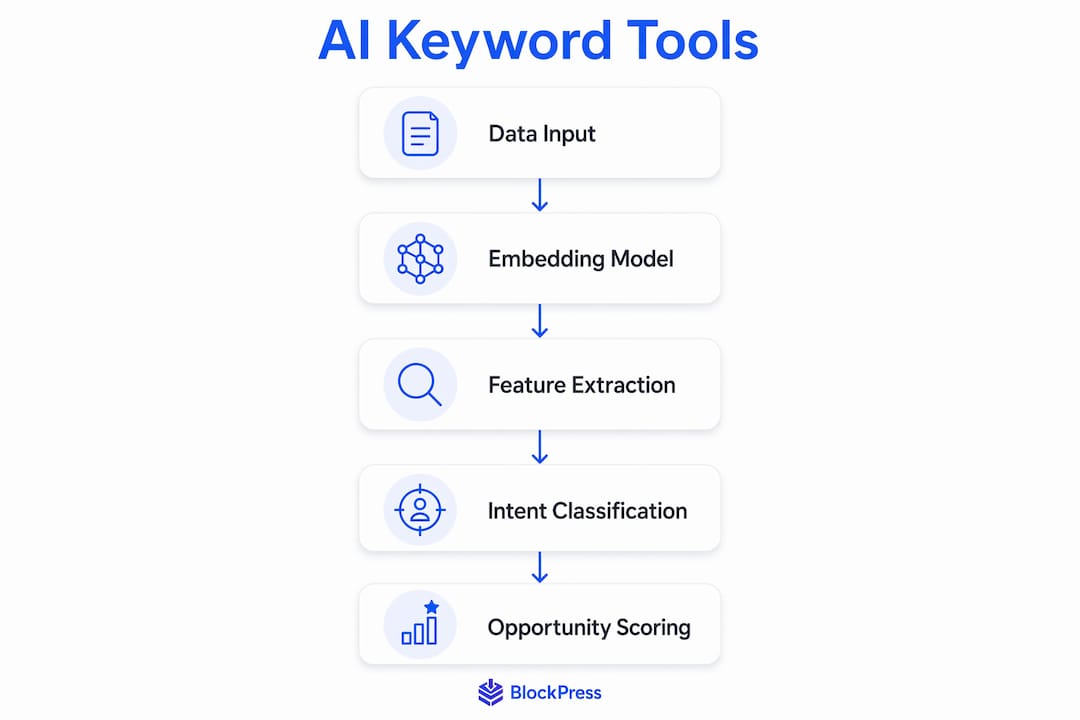
| Component | Input | Output |
|---|---|---|
| Embedding model | Raw keyword strings | Semantic vectors for similarity comparison |
| Intent classifier | Keyword + SERP snippet | Intent label + confidence score |
| LLM (brief generator) | Cluster head term + SERP context | Draft H2s, content angle, entity list |
| Clustering algorithm | Embedding vectors | Topic groups with a head term per cluster |
| Opportunity scorer | Volume, KD, intent, competition | Priority rank for each cluster |

The processing pipeline
The sequence most production tools follow:
- Ingest: Accept seed keywords, URLs, or topic descriptions as input.
- Normalize and clean: Deduplicate, strip low-quality variants, standardize formatting.
- Fan-out discovery: Expand seeds across autocomplete, PAA, and related searches to surface long-tail queries.
- Embed and cluster: Run keyword strings through an embedding model; group by cosine similarity into topic clusters.
- SERP validation: Pull live SERP data for top cluster candidates to confirm intent and check for SERP features (featured snippets, shopping results, video carousels).
- Enrich: Pull volume, keyword difficulty, and CPC from an indexed provider for shortlisted head terms.
- Score and rank: Apply a priority formula (volume × intent match × competition gap) to surface the best opportunities.
- Brief generation: Pass the top cluster to an LLM with SERP context to generate a structured content brief.
The most common architectural mistake is treating the LLM as the data source. LLMs are reasoning engines. They need a verified keyword database or live SERP connection to produce reliable volume and difficulty figures. Without that connection, fabricated metrics are the predictable result.
What each AI-driven feature actually does
Knowing the feature name is not enough. Here is what each one produces and how you use the output.
Keyword ideation and expansion takes a seed term and generates variants, question formats, and related concepts. The output is a flat list of candidate keywords. You use it to build the raw pool before any filtering or clustering. Tools like ChatGPT (OpenAI) and Google Keyword Planner both do this, though ChatGPT's output requires enrichment from a database before you can trust the volume figures.
SERP-native discovery (fan-out) queries autocomplete, PAA boxes, and related searches programmatically. The output is a discovery tree: one seed becomes dozens of branches, each branch a real query users typed. This is where you find fresh long-tail terms that Semrush or Ahrefs haven't indexed yet.
Intent classification assigns each keyword a label: informational, navigational, commercial, or transactional. A good classifier also returns a confidence score. You use low-confidence labels as a flag for manual SERP review rather than trusting the label outright.

Semantic clustering groups keywords by meaning using embeddings. The output is a set of topic clusters, each with a proposed head term. This is the feature that turns a list of 2,000 keywords into 40 manageable content topics. Tools like Surfer SEO and Semrush's Keyword Strategy Builder both implement this natively.
Opportunity scoring combines volume, keyword difficulty, and intent match into a single priority rank. The output tells you which clusters to work on first. Treat it as a starting point, not a final answer — the score doesn't know your domain authority or your existing content coverage.
SERP feature detection identifies whether a query triggers a featured snippet, video carousel, shopping result, or AI Overview. This matters because semantic ranking favors entity prominence and topical coverage, and SERP features signal the content format Google prefers for that query.
Content brief generation passes the cluster head term, top-ranking SERP context, and entity list to an LLM, which returns a structured brief. A typical brief output looks like this:
Cluster: "best running shoes for flat feet" Intent: Commercial Suggested H2s: What to look for in a stability shoe | Top picks under $120 | How arch support affects overpronation Key entities: motion control, arch support, overpronation, Brooks, ASICS, podiatrist Evidence links: [top 3 ranking URLs]
Pro Tip: Always check whether the brief's suggested entities actually appear in the top-ranking pages. Tools like RankIQ and Surfer SEO pull entity data from live SERPs. A brief built on stale training data will miss the entities Google currently associates with the topic.
For ecommerce SEOs, search intent classification is the feature that pays off fastest — it separates product pages from blog content before you spend a single hour writing.
A repeatable human + AI workflow with copy-ready prompts
This is the pipeline you can run today. Human checkpoints are marked explicitly.
- Define your seed list. Write 5–10 seed terms that represent your core topics. This is a human step — the AI cannot know your business priorities.
- Run fan-out discovery. Feed seeds into a SERP-discovery API or a tool with autocomplete expansion. Collect the raw output (expect 200–1,000 queries per seed).
- Deduplicate and normalize. Strip near-duplicates, remove branded terms you don't want to target, and standardize formatting. Most tools do this automatically; spot-check the output.
- Embed and cluster. Run the cleaned list through a clustering step. Human checkpoint: review cluster labels and merge any groups that overlap semantically.
- Enrich head terms. Pull volume, keyword difficulty, and CPC for the top 1–3 head terms per cluster from Ahrefs, Semrush, or Google Keyword Planner. Do not skip this step for any term you plan to publish against.
- Score and prioritize. Apply your opportunity formula. Human checkpoint: override the score for any cluster where you have domain-specific context (existing content, seasonal timing, brand fit).
- Generate briefs. Pass shortlisted clusters to an LLM with SERP context. Review every brief before it goes to a writer.
- Publish and monitor. Track performance in GSC. Feed impression data back as new seeds for the next cycle.
Copy-ready prompt templates
Discovery from a seed:
You are an SEO strategist. Given the seed topic "[SEED]" and the following autocomplete suggestions [LIST], generate 30 long-tail keyword variants grouped by search intent (informational, commercial, transactional). Output as JSON: {intent, keyword, rationale}.
Batch intent classification:
Classify each keyword below by search intent. Return JSON: {keyword, intent, confidence_score}. Keywords: [CSV LIST]
Semantic clustering:
Group the following keywords into topic clusters based on semantic similarity. For each cluster, assign a head term and a content type (blog post, product page, FAQ). Output as JSON: {cluster_id, head_term, content_type, keywords[]}.
Content brief generation:
You are a senior content strategist. For the keyword cluster "[HEAD TERM]" with intent "[INTENT]", generate a content brief including: title options (3), suggested H2s (5), key entities to cover, and the primary question this content must answer. Base your output on these SERP titles: [TOP 3 TITLES].
Batch your prompts in CSV or JSON format from the start. Sending keywords one at a time multiplies your API costs and makes output parsing inconsistent. A structured input schema with a defined output schema cuts processing time and makes downstream automation far cleaner.
Pro Tip: For any cluster you plan to prioritize, run a manual SERP check before generating the brief. Look at the top three results: are they blog posts, product pages, or tool pages? If the SERP is dominated by a format you can't match, the opportunity score is misleading regardless of what the AI says.
Which tools should you actually use?
There are three practical setups, each suited to a different team size and workflow.
-
LLM assistant + manual exports (ChatGPT, Claude): Best for solo SEOs and small teams who want fast ideation without a subscription to a full database. You write the prompts, export your own keyword lists from Google Keyword Planner or Ubersuggest, and feed them in. The standout capability is flexible prompt design. The limitation is that volume and difficulty data must come from a separate source — the LLM itself will fabricate those figures if you ask it directly.
-
Database products with built-in AI (Ahrefs, Semrush, Surfer SEO, KWFinder, Ubersuggest, RankIQ): Best for content teams and agencies that need reliable metrics alongside AI features. Ahrefs and Semrush connect their own click and query datasets to AI clustering and intent tools, so the enrichment step is built in. Surfer SEO and RankIQ focus on content brief generation using live SERP entity data. KWFinder suits smaller budgets with solid long-tail discovery. Alli AI adds on-page automation on top of keyword data, making it useful for teams managing large site inventories.
-
MCP/agent-style integrations (LLM + live index via API): Best for enterprise teams and developers who want a custom pipeline. An agent orchestrates the full workflow: fan-out discovery via a SERP API, embedding and clustering in a vector database, enrichment via a keyword API, and brief generation via an LLM. This setup gives the most control and the lowest per-query cost at scale, but requires engineering resources to build and maintain. For teams exploring end-to-end AI automation, this is the architecture worth understanding before committing to a vendor.
Pro Tip: Google Keyword Planner remains the most underrated free tool in this list. Its volume data comes directly from Google Ads, which means it reflects actual auction activity rather than a third-party estimate. Use it to validate head-term volume before you commit to a cluster.
Where AI keyword tools fail
Knowing the failure modes is as useful as knowing the features.
- Hallucinated keywords: LLMs without a live data connection invent plausible-sounding queries that have no real search volume. The tell is a keyword that looks reasonable but returns zero results in any index.
- Fabricated SERP features: An AI might claim a query triggers a featured snippet when it doesn't. Always verify SERP features manually for any term you're building content around.
- Misleading difficulty estimates: Keyword difficulty scores vary significantly between tools because each uses a different formula. A KD of 40 in one tool is not the same as KD 40 in another.
- Intent misclassification at the edges: Queries with ambiguous intent ("best running shoes") get mislabeled more often than clear transactional or informational queries. Low-confidence scores are the signal to check manually.
Never send raw GSC query data or proprietary site analytics into a third-party LLM without reviewing that tool's data retention policy. Your query data is a competitive asset. Some API providers use submitted data for model training by default unless you opt out explicitly.
Data concerns to address before you start: confirm whether the tool stores your inputs, whether it uses them for training, and whether your data is processed in a region that meets your compliance requirements.
Red-flag checklist — verify immediately if you see:
- Volume or difficulty figures with no cited source or index
- Suggested traffic gains stated as specific percentages with no methodology
- Clusters where all keywords are near-identical paraphrases (deduplication failed)
- Intent labels with no confidence score attached
Pro Tip: Treat any AI-generated metric as a hypothesis, not a fact. The verification step is not optional — it's the step that separates a professional SEO workflow from a content spam operation.
How to verify AI outputs before you act on them
Verification is a process, not a one-time check. Build it into your workflow as a fixed step, not an afterthought.
- Sample your clusters. Review 10–15% of all clusters manually before enrichment. Check that the head term accurately represents the group and that the intent label matches what you see in the SERP.
- Cross-check head terms in GSC, Ahrefs, or Semrush. For every head term you plan to publish against, confirm volume and keyword difficulty in at least one indexed source. This is the ground-truth step that catches hallucinated metrics.
- Run a manual SERP check for top priorities. Open the top three results for your highest-priority clusters. Confirm content format, SERP features, and entity coverage. On-page SEO elements visible in top-ranking pages tell you more about what Google wants than any AI brief.
- Validate commercial intent with CPC data. Before labeling a cluster as commercial, check that the CPC is above zero in Google Keyword Planner or a similar source. Zero CPC on a "commercial" keyword is a strong signal the intent label is wrong.
- Log every decision. Record which clusters you accepted, modified, or rejected, and why. This audit trail makes your next research cycle faster and gives you data to improve your prompts.
Procedural rule: assign one person to sign off on enriched clusters before they enter the editorial calendar. AI outputs should never flow directly into a content brief without a human review step.
Pro Tip: Require a "data provenance" field on every AI output your team acts on. That field should state the source (GSC, Ahrefs, SERP-native discovery) and the date the data was pulled. Without it, you have no way to audit a bad recommendation six months later.
What to expect in time and cost
The time savings are real, but they concentrate in specific parts of the workflow.
- Ideation and clustering: Reduced from 4–6 hours to 15–30 minutes for a 300-keyword project.
- Intent classification: A batch of 500 keywords that takes 2–3 hours manually runs in under 5 minutes with a classifier.
- Brief generation: A brief that takes a senior SEO 45–60 minutes to write manually takes 3–5 minutes with an LLM, plus 10–15 minutes of human review.
- Enrichment: This step does not compress much. Pulling volume and KD for 50 head terms from Ahrefs or Semrush takes roughly the same time whether you do it manually or via API.
Pricing shapes vary by tool type: subscription (Ahrefs, Semrush, Surfer SEO), per-query credits (SERP discovery APIs), or per-API-call (OpenAI, DataForSEO). The cost center in most workflows is enrichment, not discovery. Fan-out discovery is cheap; pulling volume and KD for every discovered term is expensive.
Cost-control rule: run broad discovery cheaply using SERP-native fan-out, then pay for enrichment only on your shortlisted head terms. Enriching 50 terms costs a fraction of enriching 2,000.
Pro Tip: Set a hard cap on the number of terms you enrich per research cycle. A good rule: enrich no more than 3 head terms per cluster, and only for clusters you've already decided to pursue. This keeps API costs proportional to actual publishing output.
A practical integration example: Blockpress and verified keyword data
Here is how a Shopify merchant using Blockpress would run this pipeline end-to-end.
The scenario: A merchant selling outdoor gear wants to build a content cluster around "hiking boots for beginners."
- Step 1: Enter the seed topic in Blockpress. The editor pulls GSC data for the domain, surfacing existing impressions and click gaps related to hiking footwear.
- Step 2: An AI clusterer proposes 8 topic groups from the fan-out discovery output. The editor reviews and selects 3 clusters that match content gaps confirmed by GSC.
- Step 3: Enrichment pulls volume and keyword difficulty from a keyword database for the 3 head terms. The editor confirms the metrics before proceeding.
- Step 4: Blockpress generates an AI article draft for the top-priority cluster, pre-loaded with the verified head term, suggested H2s, and entity list from the brief.
- Step 5: The editor reviews the draft using Blockpress's live SEO scoring, adjusts entity coverage, and publishes directly to Shopify.
Fields passed between systems:
seed: "hiking boots for beginners"cluster_id: hb-001head_term: "best hiking boots for beginners"intent: commercialsuggested_H2s: ["How to choose your first pair," "Waterproof vs. non-waterproof," "Top picks under $100"]evidence_links: [top 3 SERP URLs]volume: [from keyword database]KD: [from keyword database]
Blockpress adds value at the editorial layer: it drafts the article, scores it for SEO and readability in real time, and publishes on schedule without the merchant leaving Shopify. For merchants building topic clusters on Shopify, this closes the gap between keyword research and published content without three separate tools.
Pro Tip: Feed your GSC impression data back into the next discovery cycle as new seeds. Queries you already rank for on page 2 or 3 are your highest-probability wins — they need content improvement, not new content.
Key Takeaways
AI keyword tools work best as a reasoning and automation layer paired with verified ground-truth sources — never as a standalone replacement for human strategy and data validation.
| Point | Details |
|---|---|
| AI is a middle layer, not a data source | Connect LLMs to a verified keyword index (Ahrefs, Semrush, GSC) or SERP API before trusting any metric. |
| Fan-out discovery finds what indexes miss | Expanding seeds across autocomplete, PAA, and related searches surfaces fresh long-tail queries no pre-computed database has yet. |
| Verify before you publish | Sample 10–15% of clusters manually and cross-check head terms in GSC or an indexed tool before any term enters the editorial calendar. |
| Discover broadly, enrich narrowly | Run cheap SERP-native discovery first, then pay for volume and KD data only on shortlisted head terms to control costs. |
| Blockpress closes the editorial gap | For Shopify merchants, Blockpress connects verified keyword outputs to AI drafts, live SEO scoring, and direct publishing in one editor. |
The gap between what AI promises and what actually matters
There's a version of this conversation that treats AI keyword tools as a magic layer that makes SEO easy. That version is wrong, and it's worth saying plainly.
The tools that deliver real results share one characteristic: they are wired to verified data. AI tools are reasoning engines, not truth machines — a point that gets buried in vendor marketing but shows up immediately when you audit a batch of AI-generated keyword clusters and find volume figures that don't exist in any index.
What actually matters in practice is the verification habit. The SEO professionals who get the most out of these tools are the ones who treat every AI output as a draft, not a deliverable. They spot-check clusters, cross-reference head terms in GSC, and run manual SERP checks on their top priorities before a single word goes to a writer. The AI-plus-human workflow is not a compromise — it's the only configuration that consistently produces reliable results.
The other thing worth noting: the time savings are real, but they shift the work rather than eliminate it. You spend less time on discovery and clustering, and more time on judgment calls — which clusters actually fit your content strategy, which intent labels need a second look, which briefs need entity coverage that the AI missed. That's a better use of your time. But it's still time.
Blockpress brings verified keyword data into your Shopify editor
Most Shopify merchants piece together keyword research in one tool, content briefs in another, and publishing in a third. Blockpress replaces that fragmented setup with a single AI-native editor built directly into Shopify.
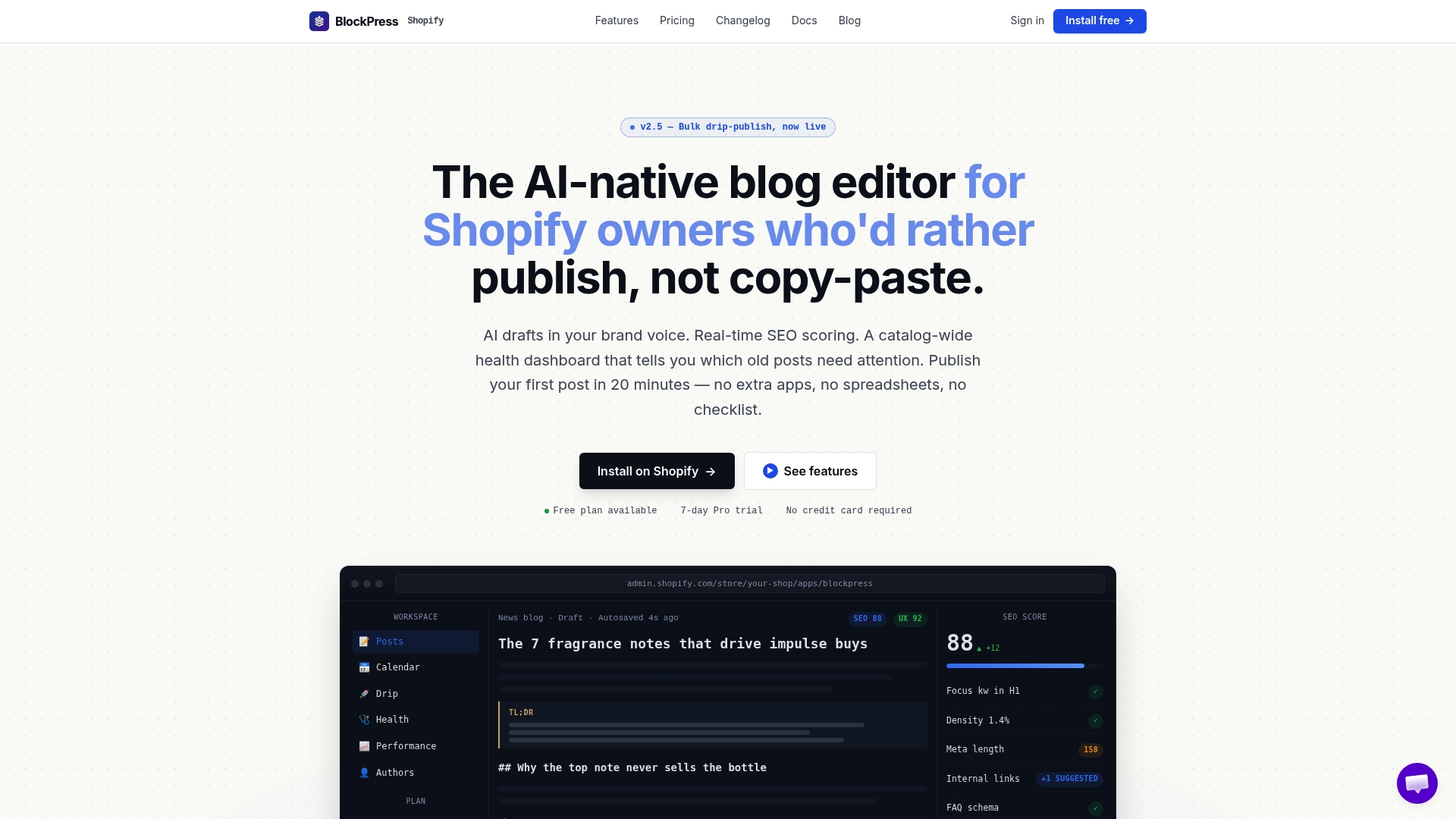
Blockpress pulls real Google keyword data into your editorial workflow, scores every article for SEO and readability as you write, generates AI drafts from verified keyword briefs, and publishes on a drip schedule without you leaving your store. The workflow described in this article — seed to cluster to brief to published post — runs inside one editor, with per-article analytics tracking performance after publish. If you're ready to connect verified keyword research to your Shopify content calendar, explore Blockpress and see how the editorial layer fits your existing process.
Useful sources
- AI Keyword Research: How It Works and 9 Prompts to Start (Ahrefs): The clearest explanation of why LLMs need a verified database connection, with nine copy-ready prompts for common research tasks.
- Keyword Research API: Automate Keyword Discovery with Query Fan-Out: A technical walkthrough of the fan-out discovery pipeline — essential reading if you're building or evaluating a SERP-native discovery setup.
- Automate Keyword Research with AI: Step-by-Step Guide for 2026: Practical workflow guide with realistic time estimates for each stage of an AI-assisted research cycle.
- How Google NLP Works (Semantic SEO Primer): Explains how Google parses entities and assigns salience — directly relevant to brief generation and content structure decisions.
- SEO-Driven Blog Strategies: 8 Examples That Rank (Blockpress): Real examples of topic clustering applied to Shopify stores, with notes on how AI-assisted grouping maps to content calendars.
FAQ
How do AI keyword tools generate keywords without inventing them?
The best tools pull from verified sources — keyword indexes, SERP autocomplete, and PAA data — and use the AI layer to organize and classify that real data. LLMs that generate keywords without a live data connection do fabricate terms, which is why connecting to a verified index is non-negotiable.
What is the difference between keyword clustering and intent classification?
Clustering groups keywords by semantic similarity into topic buckets; intent classification labels each keyword by what the searcher wants to do (find information, buy, compare, navigate). Both steps are usually run in sequence — cluster first, then classify the head term of each cluster.
How accurate are AI-generated keyword difficulty and volume scores?
Accuracy depends entirely on the data source behind the score. Tools connected to large click and query datasets (Ahrefs, Semrush) produce reliable estimates; LLM-only outputs without a database connection should never be trusted for these metrics. Always cross-check head-term metrics in GSC or an indexed tool before prioritizing a cluster.
Can Blockpress consume AI keyword outputs directly?
Yes. Blockpress pulls real Google keyword data into the Shopify editor and supports AI-generated article drafts built from verified keyword briefs, with live SEO scoring applied as you write and publish.
How do I avoid sending sensitive site data to third-party AI tools?
Review the data retention and training policies of any tool before submitting GSC query data or proprietary analytics. Many API providers use submitted data for model training by default — opt out explicitly, or use anonymized or aggregated data sets when running discovery workflows through external models.